
Table of Contents
In the data-driven ecosystem of 2026, the success of your performance marketing hinges on the integrity of your conversion signals. Meta Pixel Helper 404 and duplicate event fix has emerged as one of the most critical technical workflows for advertisers who demand precision within Meta Platforms. When your tracking infrastructure is compromised, your ROAS (Return on Ad Spend) data becomes a work of fiction, leading to catastrophic budget misallocations and high-stakes decision-making based on ghost data.
Most AdveMost Advertisers Are Flying Blind.
If your Meta Pixel Helper 404 and duplicate event fix isn’t already part of your weekly QA checklist, you’re pouring ad budget into a data black hole.
In the high-stakes ecosystem of 2026, where Meta’s Andromeda AI processes billions of signals per second, the difference between profitability and waste comes down to one thing: data integrity. A single misconfigured pixel path or a duplicate event that slips past your radar can send your ROAS reports into a fantasy land, forcing your algorithm to optimize for ghosts instead of real buyers.
This isn’t a “nice-to-have” technical chore. This is the foundation of high-performance advertising. If you’re ready to stop guessing and start tracking with surgical precision, this definitive guide will walk you through every technical nuance of the Meta Pixel Helper 404 and duplicate event fix.
By the end of this 3,000-word technical breakdown, you’ll know exactly how to hunt down hidden ghost pixels, stabilize your Event Match Quality (EMQ), and align your server-side setup so your data is clean enough to satisfy even the most demanding CFO.
The Evolving Role of Meta Pixel Helper in 2026
Despite the aggressive industry pivot toward server-side tracking and API-led measurement, the Meta Pixel Helper remains the absolute front-line diagnostic weapon for any advertiser who wants to see exactly what the browser is attempting to communicate to Meta’s servers in real-time.
This free Chrome extension isn’t just a validator—it’s a forensic tool. When you’re in the thick of a Meta Pixel Helper 404 and duplicate event fix, you need granular, immediate feedback on everything from misplaced script tags to missing event IDs.
The Diagnostic Power of the Helper:
The Pixel Helper is your microscope. Here’s what it reveals:
- Active Pixel ID Verification: Confirms that the correct ad account is receiving data, preventing you from accidentally sending your competitor’s pixel data to your dashboard. Pair this with a proper Meta ads account setup to ensure clean data from the start.
- Event Firing Sequence Analysis: Ensures that a high-value
LeadorPurchaseevent fires exactly when it should—after the form is validated, not before the user even clicks “Submit.” - Parameter Validation: Checks for required data like
value,currency, and, most critically, theevent_id, which are the lifeblood of high-level attribution in 2026. - Technical Warning Signals: Highlights issues like “Pixel Took Too Long to Load” or “Not a Standard Event,” which are often precursors to a full-scale diagnostic session.
However, relying solely on the Helper’s superficial green checkmarks is a mistake. To truly master the Meta Pixel Helper 404 and duplicate event fix, you must understand the underlying request architecture to find the “silent” killers of attribution that hide in the browser’s console logs.
The “Ghost Pixel” Scenario – Solving Hidden Duplication
One of the most elusive and frustrating issues in 2026 is the Ghost Pixel. This occurs when an unauthorized or outdated Pixel ID is still executing on your domain, often triggering “Duplicate Event” warnings for pixels you don’t even own. This is a common hurdle when learning how to run Meta Ads on established websites that have changed hands or agencies over the years.
When a ghost pixel lives on your site, your event count inflates artificially. You might be optimizing for a purchase event that’s actually firing twice due to legacy code, skewing your entire attribution model.
How Ghost Pixels Appear:
Ghost pixels aren’t always malicious, but they are always destructive. They typically appear through:
- Hacked Plugins: Malicious scripts that inject a third-party pixel to siphon your conversion data and retarget your audience for their own gain.
- Legacy Code Remnants: Abandoned code snippets from a previous site owner or a former agency that were never fully purged from the header scripts.
- Third-Party Widgets: Chatbots or review widgets that inject their own pixel to track “their” engagement but end up polluting your primary data stream.
The Fix: Use the “Network” tab in your browser’s developer tools (F12) and filter for facebook.com/tr/. If you see a Pixel ID that doesn’t exactly match your Business Manager, you have found a ghost. Removing these intrusions is the critical first step in any Meta Pixel Helper 404 and duplicate event fix and is essential for a clean Meta Pixel advanced tracking environment.
Decoding the Meta Cookies – The fbp and fbc Technicality
To perform a successful Meta Pixel Helper 404 and duplicate event fix, you must understand the two primary identifiers Meta uses to track users across the fragmented web of 2026: the _fbp (Browser ID) and _fbc (Click ID) cookies.
As first-party data becomes the gold standard under evolving privacy regulations, these cookies are more important than ever for maintaining high Event Match Quality (EMQ).
The Vital Role of _fbp and _fbc:
_fbp(Meta Browser ID): This cookie identifies the unique browser session. If a 404 error is blocking the script that sets this cookie, your server-side Meta Pixel GTM loses its primary anchor for identifying the user. Without the properfbpvalue, Meta has no deterministic way to link a server-sidePurchaseevent back to a specific browser session, tanking your match rates._fbc(Meta Click ID): This cookie is created when a user arrives via an ad click containing afbclidparameter. If this cookie is missing or corrupted by a script error, your direct click attribution collapses, and you revert to fuzzy, probabilistic modeling.
The Strategic Risk: If your Meta Pixel Helper shows a 404 for the base script, these cookies won’t be generated at the start of the session. This forces Meta to rely on “Probabilistic Modeling” rather than “Deterministic Data,” causing your CPA to spike and your lookalike audiences to degrade in quality. This is especially critical for brands leveraging Meta ads for small business, where every dollar must be tracked with surgical accuracy. A rigorous Meta Pixel Helper 404 and duplicate event fix ensures these cookies are always present.

Why 404 Errors Happen in Modern Tracking Architecture
A 404 error in your tracking logs is an SOS. It means the browser tried to call a resource—a script, a tracking endpoint, or a server container—that simply does not exist on the web. In the context of a Meta Pixel Helper 404 and duplicate event fix, these errors are almost always structural, not random.
Common 404 Root Causes:
Most 404s stem from configuration drift:
- Incorrect GTM Pathing: If you are using a custom domain for your server container (e.g.,
metrics.yourdomain.com) but have a typo in the Google Tag Manager configuration, the browser will look for a tracking file in the wrong directory. - Overly Aggressive Security Headers (CSP): Modern Content Security Policies or strict firewall rules can inadvertently block the
fbevents.jslibrary from loading, resulting in a failed request and a 404 error. - Broken Script Dependency Timing: If your conversion tag fires before the base
fbevents.jslibrary has finished loading—due to asynchronous loading issues—the browser may return a 404.
Resolving these failures eliminates the “Signal Loss” that often accompanies AEM domain verification errors 2026. Without a complete Meta Pixel Helper 404 and duplicate event fix, you are essentially flying blind.
The Duplicate Event Crisis – Deduplication Failure in Hybrid Setups
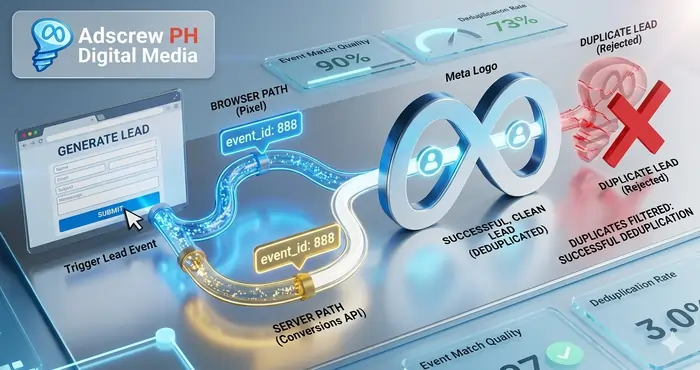
Duplication is the technical opposite of a 404: instead of missing data, you have too much of it. This crisis is usually the result of a Hybrid setup where both the browser pixel and the server-side CAPI send the same event, but the platform fails to realize they refer to the same instance.
This is a recurring nightmare for brands running Meta custom events for non‑e‑commerce lead gen. When duplication goes unaddressed, your ROAS reports lie to you. If Meta thinks you got two leads for the price of one, your algorithm will optimize for traffic that double-clicks, not traffic that buys.
The “Event ID” Pairing Mechanism
The only way to achieve a successful Meta Pixel Helper 404 and duplicate event fix in a hybrid environment is through the event_id. This unique string must be identical for the same user action across both the browser and the server.
Here’s how the merge works:
- The Browser Path: Sends a
Leadevent withevent_id: xyz789. - The Server Path (CAPI): Sends the same
Leadevent withevent_id: xyz789. - The Meta Solution: The platform sees two incoming events with the same ID within a specific timeframe and merges them into a single, high-fidelity conversion.
If the IDs don’t match, or if one side drops the ID, Meta reports two separate conversions. This is why implementing a unique event_id logic is the gold standard for ensuring 100% deduplication and building a stable reporting infrastructure. A proper fix always includes a pixel missing deduplication key fix.
Troubleshooting GTM Trigger Overlap and Tag Sequencing
Google Tag Manager is the most common source of duplicate events in the modern marketing stack. Often, multiple triggers are set to fire on the same user action—like a form submission button—leading to a “Double Fire” that demands an immediate Meta Pixel Helper 404 and duplicate event fix.
The Audit Framework for GTM:
To get your triggers under control, run this audit:
- Preview Mode Forensics: Trigger the action on your site while in the GTM Debugger. Look at the “Summary” tab to see if your “Meta Lead Tag” fired once or twice. Count every instance.
- Negative Triggers (Exceptions): Use “Exceptions” in GTM to create logic that prevents duplication. For example, if a “Form Success” tag fires, use an exception to suppress a general “Click” tag on the same button.
- Tag Sequencing: Set your tags to fire in a strict order. The base pixel must always fire before the conversion events. If your conversion event fires before the base pixel is ready, you risk dropped or corrupted signals.
Clean, predictable triggers are the foundation of a healthy Meta Pixel Helper 404 and duplicate event fix. Without them, your data remains perpetually noisy.
Advanced Browser Network Debugging for 404s
Sometimes, the Pixel Helper isn’t specific enough. When you need to look under the hood, you must use the Network Tab in Chrome DevTools. This is the “surgeon’s table” where the real Meta Pixel Helper 404 and duplicate event fix happens.
What to Look For:
Filter your network requests for /tr/ (the Meta tracking endpoint). The status codes tell the story:
- Status 200: The signal was successfully sent and received. You are clear.
- Status 404: The signal was sent to a dead end. This requires immediate investigation into your script paths or GTM container URLs.
- Status 403: The signal was “Forbidden,” usually meaning your domain hasn’t been whitelisted in your server settings, or a privacy browser extension is blocking the call.
Inspecting the “Payload” tab will show you the exact fbp, fbc, and event_id values being sent. If these critical parameters are missing, your tracking is not operating at full capacity. For anyone deploying Meta CAPI Gateway, this network check is the definitive “truth test” for server-side stability and a mandatory habit during any Meta Pixel Helper 404 and duplicate event fix. (For a deeper comparison, see Meta CAPI Gateway vs Partner Integration.)
The Psychological Impact on the Meta Algorithm
The Meta algorithm is a learning machine. It analyzes patterns in successful conversions to find more customers just like them. If you ignore the Meta Pixel Helper 404 and duplicate event fix, you aren’t just losing data—you are actively poisoning the AI.
Consider these two disaster scenarios:
- The Duplicate Trap: Duplicate events teach the AI to find “junk” traffic because the data looks twice as good as it actually is. The AI begins to optimize for users who trigger errors or double-clicks rather than actual buyers. This can cause your campaign to exit the learning phase in a completely broken state, resulting in wasted spend at scale.
- The 404 Black Hole: 404 errors prevent the AI from seeing your best customers. If your highest-value buyers are using privacy browsers that block the pixel (or if your script is broken for them), the AI will never learn their profile. It leaves money on the table because it literally cannot see the most profitable segment of your audience.
This data hygiene is particularly vital for Meta ads event priority for low volume accounts, where every single conversion signal is needed to exit the “Learning Limited” status. A rigorous Meta Pixel Helper 404 and duplicate event fix is the only way to ensure the algorithm is working for you, not against you.
Future-Proofing Against CMS Caching and Edge Latency
Modern CMS platforms like WordPress, Shopify, and Webflow use aggressive caching layers to maintain site speed. However, this caching is a major obstacle during a Meta Pixel Helper 404 and duplicate event fix.
If you delete a duplicate script from your theme’s footer but fail to purge your server-side cache, the old code might continue to fire for hours—or even days. This leads to false diagnostic reports where the Pixel Helper still shows a duplicate event that, technically, you deleted hours ago. Always clear your CDN (like Cloudflare) and local CMS caches after making any changes.
Furthermore, edge computing (running scripts at the CDN level) can sometimes create 404 errors if the edge worker is misconfigured to handle the Meta endpoint. A holistic Meta Pixel Helper 404 and duplicate event fix must include an audit of your entire delivery network, not just the website code.
Summary – The Adscrew PH Diagnostic Checklist
To maintain a pristine tracking environment and avoid the pitfalls of bad data, every advertiser should perform a monthly Meta Pixel Helper 404 and duplicate event fix audit using this technical protocol:
- Ghost Pixel Audit: Use the Network tab to ensure no unauthorized Pixel IDs are siphoning your data.
- Cookie Validation: Confirm that
_fbpand_fbcare being set on the initial page load using the browser’s Application tab. - Event ID Synchronization: Ensure your GTM Data Layer is pushing the same UUID to both the browser pixel and the Conversions API.
- Endpoint Verification: Eliminate all 404 and 403 status codes from your tracking requests.
- Final Delivery Check: Use the Meta Events Manager “Test Events” tool to confirm that Meta is successfully deduplicating your signals in the cloud.
Direct Answers
How to fix a 404 error in Meta Pixel Helper?
To fix a 404 error, first check your browser’s network tab (F12) to confirm the exact failing request. Common fixes include disabling aggressive ad-blockers, verifying your GTM container path, clearing your site cache, and ensuring your domain is whitelisted in your server settings.
How do I stop duplicate events in Meta Pixel Helper?
To stop duplicate events, you must implement proper deduplication using the event_id parameter. Ensure your browser Pixel and your server-side CAPI are sending the exact same unique event_id for the same user action. Then, audit your GTM triggers to ensure only one tag fires per event.
Why is the Meta Pixel Helper showing a pixel I don’t recognize?
If you see a Pixel ID that doesn’t match your Business Manager, you have a “Ghost Pixel.” This often comes from legacy code, compromised plugins, or third-party apps. Remove it by searching your page’s source code or GTM container for the rogue ID.
What is the difference between fbp and fbc cookies?_fbp (Browser ID) identifies the browser session. _fbc (Click ID) is set when a user clicks an ad containing a fbclid. Both are essential for high Event Match Quality (EMQ) and accurate attribution.
How does duplicate data affect Meta’s algorithm?
Duplicate events degrade algorithm performance. If Meta thinks every conversion happened twice, it will over-optimize for the wrong audiences, misallocate budget, and reduce your real-world ROAS. It forces the algorithm to learn from inflated, low-quality signals.
Should I test my pixel in incognito mode?
Yes. Testing in incognito mode without any extensions active is the best way to eliminate false positives caused by your own browser extensions interfering with the pixel installation.
FAQ: Meta Pixel Helper 404 & Duplicate Event Fix
Q1: Why does Meta Pixel Helper show “No Pixel Found”?
Ad blocker. Still loading. Wrong domain. Refresh the page. Test incognito. Check page source for fbevents.js. Clear cache.
Q2: What do green, yellow, red statuses mean?
Green = perfect. Yellow = minor warning (missing parameter). Red = critical failure. Fix reds immediately.
Q3: How to test pixel changes before going live?
Use Meta Events Manager → Test Events. Enable test mode. Use staging domain. Clear caches after testing.
Q4: Why doesn’t pixel work in incognito mode?
Privacy restrictions block third-party cookies. Safari ITP kills _fbp in 7 days. Add Conversions API (CAPI) to recover lost events.
Q5: How to fix “Pixel Did Not Load”?
Disable ad blockers. Check console for JS errors. Ensure pixel fires on page load, not just clicks. Review CSP headers.
Q6: What causes “Pixel Activated Multiple Times”?
Same Pixel ID installed twice. Check Shopify apps, GTM tags, and theme files. Remove duplicates. Keep one installation only.
Q7: Why “Invalid Pixel ID” and how to fix?
Wrong ID. Missing ID. Test ID in production. Copy the correct numeric ID from Events Manager. Paste it. Clear cache.
Q8: What does “Encoded Characters” warning mean?
You used & instead of &. Replace double-encoded characters. Use proper ampersands.
Q9: Why “Not a Standard Event”?
You used a custom event name. It still works, but standard events optimize better. Map to standard events when possible.
Q10: How does event_id deduplication work?
Send the same unique ID from browser pixel and CAPI. Meta merges them into one conversion. Without it, you count double.
Q11: Why duplicate events even with event_id?
Mismatched event names. Different IDs per tag. Timing window missed. One channel omits the ID. Check both payloads.
Q12: How to check if GTM causes duplicates?
Run GTM Preview. Trigger the action. Look at Summary tab. See if tag fired twice. Use exceptions. Suppress overlapping triggers.
Q13: How to fix Shopify duplicate events?
Use only one installation. Native Meta app only. No hardcoded code. No PixelYourSite. No additional scripts. Then test.
Q14: Why aren’t _fbp and _fbc cookies set?
Ad blocker blocked them. Consent tool suppressed them. Cookie domain mismatch. Browser privacy killed them. Fix base pixel load first.
Q15: How long do _fbp and _fbc last?
90 days default. Safari ITP limits to 7 days. Use server-side cookie setting or CAPI for longer attribution.
Q16: Why are value/currency parameters not passing?
Browser and CAPI payloads mismatch. Check Test Events tool. Ensure GTM Data Layer pushes complete data. Match parameters exactly.
Q17: What is EMQ and how to improve a low score?
EMQ = Event Match Quality. Low score = wasted spend. Add CAPI. Send email, phone, external_id, fbp, fbc. No empty values.
Q18: How do privacy features affect tracking?
Safari ITP kills cookies. Firefox blocks endpoints. Ad blockers block 30% of requests. Go hybrid: browser pixel + CAPI.
Q19: What WordPress plugins cause pixel issues?
Cookie consent plugins. Caching plugins (WP Rocket, LiteSpeed). Duplicate tracking plugins. Disable one by one. Test after each.
Q20: How does consent management affect Pixel Helper?
Before consent: Helper shows “No Pixel Found” — that’s normal. After consent: pixel fires. Implement Meta Consent Mode. Mirror consent to CAPI. Fire tags only after consent resolution.
Summary: The Final Technical Takeaway
The Meta Pixel Helper 404 and duplicate event fix is the difference between a business that grows and a business that just spends money. In 2026, the brands that win are the ones that stop accepting “close enough” data and start demanding surgical precision.
- Audit your network for 404s and ghost pixels monthly.
- Deduplicate every event using a unique
event_idin hybrid setups. - Verify your
fbpandfbccookies are firing on load. - Sequence your GTM tags to prevent race conditions.
Remember: in performance marketing, Efficiency is the strategy. Data integrity is the only tool. If your tracking stack isn’t rock solid, the rest of your marketing is just guesswork.
Need more hands‑on help? Visit Adscrew PH for additional Meta Ads troubleshooting guides.