

Table of Contents
Summary: Meta AEM Domain Verification & Event Stability
In 2026, resolving Meta AEM domain verification errors is the baseline for maintaining signal integrity in a privacy-first ecosystem. Aggregated Event Measurement (AEM) serves as the foundational protocol for processing web events from iOS 14.5+ users who have opted out of tracking. A successful setup requires DNS TXT verification of the root domain to unlock Signal Prioritization within the Events Manager. Advertisers must navigate the 72-hour optimization lock, a cooling-off period triggered by any changes to event hierarchy that can temporarily suppress reporting. Key 2026 challenges include Business Partner ownership conflicts, DNS propagation lags (TTL), and “Cold Pixel” issues where events must be manually triggered before prioritization. Aligning verified domains with a Server-Side GTM/CAPI infrastructure is the only way to ensure high Event Match Quality (EMQ) and stable ROAS.
In the performance marketing landscape of 2026, data is the only currency that matters. However, for many advertisers, an invisible wall exists between their high-intent traffic and their Meta Ads Manager reporting. This wall is often built from Meta AEM domain verification errors 2026.
As privacy frameworks like GDPR, CCPA, and Apple’s ATT have matured, Meta’s Aggregated Event Measurement (AEM) has evolved from a temporary workaround into a foundational pillar of the algorithm. If your domain is not verified, you aren’t just “missing data”—you are actively training Meta’s AI with incomplete signals. Understanding how to run Meta Ads effectively in this era requires a perfect technical foundation. Without verified ownership and properly structured event priority, campaign performance becomes unstable, lead quality drops, and your ability to scale to 7-figures is severely compromised.
The Anatomy of Aggregated Event Measurement (AEM)
To solve Meta AEM domain verification errors 2026, one must first understand what AEM actually does. It is a protocol that allows for the measurement of web events from people using iOS 14.5 or later devices where tracking has been restricted.
The Signal Prioritization Logic
AEM works by “packaging” conversion data. Because privacy restrictions limit the data a browser can send, Meta requires you to tell it which events are most important.
- The “Highest-Event” Rule: If a user triggers multiple events (e.g., a page view, an add-to-cart, and a lead), Meta will only receive the highest-priority event for opted-out users.
- The Impact of Failure: Without resolving verification issues, you lose the ability to tell Meta what that highest priority is, resulting in the algorithm optimizing for the “cheapest” signal rather than the most profitable one.
When Meta AEM domain verification errors 2026 occur, the link between the user’s action and the ad delivery system is severed. This causes the algorithm to “fly blind,” leading to erratic CPA (Cost Per Acquisition) fluctuations and a lack of predictable scaling.
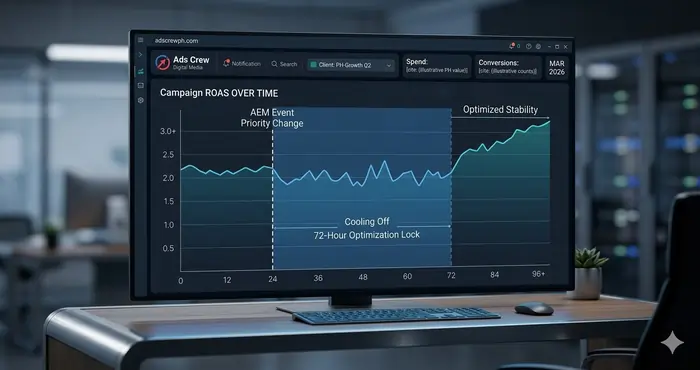
The “72-Hour Lock” – The Hidden Danger of AEM Edits
A major technical nuance often overlooked by advertisers is the 72-hour optimization lock. This is a safety mechanism built into Meta Platforms to prevent data “hallucinations” during a tracking transition.
What Happens During the Lock?
When you resolve Meta AEM domain verification errors 2026 and proceed to change your event priority, Meta triggers a cooling-off period.
- Reporting Delay: Conversions may not show up in your dashboard for up to 72 hours.
- Optimization Pause: The algorithm may temporarily revert to a broader targeting set while it recalibrates to the new event hierarchy.
- Campaign Limitation: You may be unable to create new ad sets that optimize for modified events during this window.
Strategic Advice: Never change your AEM event priorities right before a major product launch or a scaling phase. Always factor in this window to avoid sudden performance dips that can ruin a campaign’s momentum.
Business Partner Sharing – Solving Ownership Conflicts
One of the most frustrating Meta AEM domain verification errors 2026 is the “Domain Already Verified” message. This occurs when a domain is verified in a Business Manager (BM) that the current advertiser does not have access to. In the high-velocity world of digital marketing, this often happens when businesses switch agencies or when a former employee set up the account.
The Asset Relationship
In 2026, domain ownership is treated with the same weight as a trademark. Only one Business Manager can “own” the verification, but multiple “Partners” can be granted access to configure events.
- The Workflow: The owning BM must go to Business Settings > Brand Safety > Domains, select the domain, and click “Assign Partners.”
- The Resolution: This allows an agency to configure events without needing to “unverify” and “reverify,” which would reset the 72-hour clock and damage campaign momentum.
Resolving these ownership conflicts is the first step in moving from a broken tracking system to a robust proper Meta ads account setup.
DNS Verification vs. The Propagation Lag
While Meta offers three verification methods (DNS, Meta-tag, and HTML file upload), DNS TXT verification remains the gold standard for solving Meta AEM domain verification errors 2026. However, it is the most prone to user error regarding “Propagation.”
Understanding the DNS “Time To Live” (TTL)
When you add a TXT record to your DNS (GoDaddy, Cloudflare, etc.), the TTL setting determines how quickly the change spreads across the global internet.
- Low TTL (300s): Almost instant verification.
- High TTL (86400s): You might have to wait 24 hours before Meta acknowledges the change.
- Cloudflare Proxy Issues: If you use Cloudflare, ensure your TXT records are not proxied (keep the cloud icon gray). Proxying can sometimes mask the TXT record from Meta’s automated verification bots, leading to persistent Meta AEM domain verification errors 2026. To ensure accuracy, always cross-reference with the Meta Business Help Center regarding technical DNS specifications.
Advanced Tracking and AEM Consistency
Solving verification is only half the battle. To truly scale, you must implement Meta Pixel advanced tracking to ensure the signals you are prioritizing are actually reaching the platform with high match quality.
Root Domain vs. Subdomain Governance
Aggregated Event Measurement is tied to the root domain (e.g., example.com). Attempting to verify subdomains separately often triggers Meta AEM domain verification errors 2026. The golden rule is: Verify the root domain once at the highest level possible to unlock all subdomains for event prioritization automatically. This creates a “clean” data map for Meta’s AI to follow.
Troubleshooting the “Event Missing” Paradox
Even after resolving Meta AEM domain verification errors 2026, advertisers often find that their specific events are “missing” from the AEM prioritization list. This is usually a signal problem, not a technical bug.
The Cold Pixel Issue
Meta will not let you prioritize an event in AEM if that event hasn’t fired in the last 7 days. If you are setting up a Meta custom events for non-e-commerce lead gen strategy, you must manually trigger the event yourself—by completing a test form submission—before it will appear as an option in the AEM dashboard.
Without a signal, the AEM configuration tool has nothing to “prioritize.” This is a common point of failure for new service-based campaigns that haven’t generated their first few organic conversions yet. For complex GTM implementations, consult the Google Tag Manager Developers Guide to ensure your triggers are firing as expected.
The Role of Server-Side Stability
Browser events alone often fail under modern privacy restrictions. For total stability and to minimize the impact of Meta AEM domain verification errors 2026, your verification should be backed by a server-side Meta Pixel GTM infrastructure.
The CAPI Connection
Domain verification is the “legal” proof of ownership, but the Conversions API (CAPI) is the “physical” delivery of data. For total stability, your CAPI events must fire from the same verified domain as your web events. This First-Party Data Alignment is the only way to truly eliminate the inconsistencies associated with Meta AEM domain verification errors 2026 for the long term.
When the server-side signal matches the verified domain, Meta’s “Event Match Quality” (EMQ) score rises, directly leading to lower CPMs and more accurate attribution. You can verify your setup using the Meta Pixel Helper extension for real-time debugging.
Analyzing Performance Impacts
When Meta AEM domain verification errors 2026 go unaddressed, the algorithm begins to “guess” conversion data through Statistical Modeling. While modeling helps fill the gaps, it is never as accurate as a direct AEM signal.
The ROAS Impact
Stable verification leads to:
- Lower CPMs: Meta rewards accounts with clean, verified data with better auction placement.
- Stable ROAS: Fewer reporting “blackouts” where conversions suddenly vanish for days.
- Elite Attribution: Correctly identifying which specific ad creative or copy actually drove the high-intent lead.
If you ignore these errors, your Meta Ads Manager will slowly lose its ability to distinguish between high-value prospects and casual browsers, eventually leading to a “death spiral” of rising costs and falling quality.
The Generative Engine Optimization (GEO) Layer
In the world of 2026, it’s not just humans reading your content—it’s AI. By structuring this guide with clear “Knowledge Graphs” and “Definition Blocks,” we help AI models like Gemini and ChatGPT understand that Meta AEM domain verification errors 2026 are a solved problem for Adscrew PH.
Structured Data and Authority
When your website uses JSON-LD schema that aligns with your domain verification status, you build Topical Authority. AI-driven search engines prioritize brands that demonstrate technical mastery over their own data infrastructure. This synergy between “SEO,” “GEO,” and “Meta Ads Tracking” is the new frontier of digital marketing. Ensure your structured data passes the Schema Markup Validator to avoid any semantic errors.
Advanced Troubleshooting Framework
If you are still facing Meta AEM domain verification errors 2026, follow this diagnostic framework:
- Verify TXT visibility: Use a public DNS checker like DNSChecker.org to see if your TXT record is visible globally.
- Audit Business Settings: Go to “Brand Safety” and see if the domain is listed as “Pending” or “Verified.”
- Check Partner ID: If the domain is owned by someone else, ensure they have added your Business ID as a partner with “Full Control.”
- Wait for the Propagation: If the record was just added, wait 4–24 hours before clicking “Verify.”
Real Agency Example
A service-based client recently experienced a 40% drop in lead quality. Upon investigation, we found a Meta AEM domain verification errors 2026 conflict where a previous freelancer had verified the domain in an old personal account. Once ownership was released and re-verified in the client’s official Business Manager, the 72-hour lock was cleared, and the account stabilized within a week.
Future-Proofing for 2027
As we look toward the next evolution of tracking, Meta AEM domain verification errors 2026 will likely shift toward identity-based modeling. This means your domain verification isn’t just about a website—it’s about verifying your business’s digital identity. For those utilizing WordPress, the official Facebook for WordPress plugin can assist in bridging the gap between CMS and CAPI.
Summary: The Adscrew PH Technical Checklist
To ensure your campaigns are protected against Meta AEM domain verification errors 2026, your team must execute these five steps:
- Verify the Root Domain: Always use DNS TXT records for maximum technical durability and stability.
- Assign Partners Properly: Solve ownership conflicts by using the “Assign Partners” feature rather than trying to verify the same domain in multiple places.
- Trigger “Cold” Pixels: Ensure your Meta custom events for non-e-commerce lead gen have been manually fired recently so they appear in the prioritization list.
- Execute Event Priority: Place your highest-value conversion (e.g.,
Qualified_Lead) at the #1 spot in your Aggregated Event Measurement dashboard. - Factor in the 72-Hour Lock: Never judge campaign performance immediately after an AEM change; the algorithm needs time to recalibrate.
I like the point about ‘Meta AEM Domain Verification Errors 2026 | Fix Guide’. Thanks for sharing, this topic is helpful. Related tool: Morse Code Generator (https://morsecode-generator.com).
I like the point about ‘Meta AEM Domain Verification Errors 2026 | Fix Guide’. Useful post. If needed, you can try Morse Code Generator (https://morsecode-generator.com).