
Table of Contents
Summary: Server-Side Meta Pixel GTM Setup
In 2026, a server-side Meta Pixel GTM container setup is the industry standard for bypassing client-side data loss caused by Intelligent Tracking Prevention (ITP) and ad blockers. This architecture utilizes a Google Cloud Run environment to act as a private data vault, moving tracking logic from the user’s browser to a first-party subdomain (e.g., collect.yourdomain.com). By implementing a Hybrid Tracking Pipeline, advertisers send redundant signals via the browser Pixel and the Meta Conversions API (CAPI). Critical to this 2026 setup is Event Deduplication using a shared event_id and SHA256 PII Hashing to ensure high Event Match Quality (EMQ). This sovereign data control enables Meta’s Andromeda AI to achieve 100% attribution accuracy, stabilizing the learning phase and lowering CPAs for high-scale portfolios.
Direct Answer: Server-side tagging moves tracking logic from the browser to your own server environment, preserving data accuracy and bypassing ad blockers and ITP restrictions.
Introduction: Entering the Era of Sovereign Data Control
A server-side Meta Pixel GTM container setup represents the absolute pinnacle of modern advertising infrastructure. In 2026, the digital marketing landscape has fundamentally shifted. We no longer live in an era where “best effort” tracking is sufficient for scaling high-performance campaigns. As privacy regulations like GDPR and CCPA evolve, and browser-level restrictions from Apple (ITP) and Google (Privacy Sandbox) become the standard, traditional client-side tracking is crumbling.
For businesses operating within the ecosystem of Meta Platforms, the ability to maintain a persistent, accurate, and high-fidelity data connection is the single greatest competitive advantage. A server-side Meta Pixel GTM container setup is the definitive solution to “data blindness.” By moving your tracking logic from the user’s volatile browser into a secure, private server environment, you take full ownership of your data stream. This guide provides a complete implementation framework, including technical architecture, algorithm optimization insights, and the campaign-level strategies used by elite media buying teams to maintain a proper Meta Ads account setup.
Why Server-Side Tracking Is the 2026 Industry Standard
Over the past few years, browser-level tracking has become increasingly limited. In 2026, third-party cookies are effectively dead, and first-party cookies set via JavaScript are often capped at a 24-hour or 7-day lifespan. This “cookie-shortening” makes long-cycle attribution—such as tracking a user who clicks today but buys in 10 days—nearly impossible for standard pixels.
The Crisis of Client-Side Tracking
Traditional Meta Pixel implementations rely on “Client-Side” execution. This means the tracking code runs in the user’s browser (Chrome, Safari, etc.). However, this layer is now heavily policed by:
- Ad Blockers: Millions of users now use extensions that specifically block
fbevents.js. - Privacy Frameworks: iOS 14.5+ and subsequent updates have made “Opt-In” the bottleneck for data collection.
- ITP/ETP: Intelligent Tracking Prevention in Safari and Enhanced Tracking Protection in Firefox treat tracking scripts as a security risk.
These changes result in incomplete conversion tracking, inaccurate attribution models, and significantly weakened campaign optimization signals. A server-side Meta Pixel GTM container setup addresses these limitations by moving the processing hub away from the browser. Instead of the browser talking directly to Meta, the browser talks to your server, and your server talks to Meta. This shift restores data reliability and provides the Andromeda AI with the “clean” signals it needs to lower your CPA. You can see how this integrates with a Meta Pixel advanced tracking setup to create a bulletproof data layer.
Understanding the Server-Side Tracking Architecture
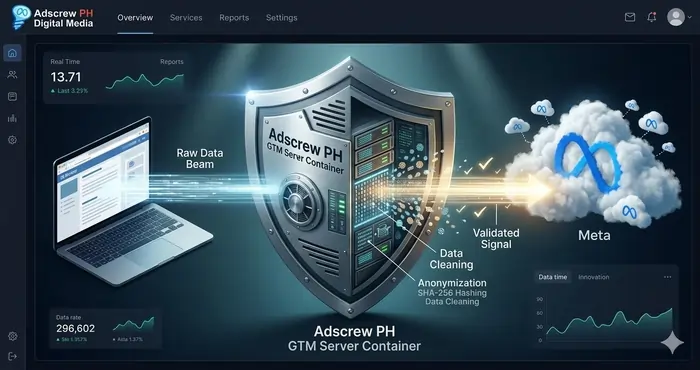
To master a server-side Meta Pixel GTM container setup, you must view the tracking pipeline as a series of interconnected vaults. Each layer serves a specific purpose in validating and enriching the data before it reaches Meta’s event processing system.
The Hybrid Tracking Pipeline
A professional server-side Meta Pixel GTM container setup doesn’t actually remove the browser pixel; it augments it. This is known as a “Hybrid” setup.
| Tracking Layer | Technology | Primary Function |
|---|---|---|
| Browser Layer | Meta Pixel (Standard) | Captures initial user-agent strings and click IDs |
| Tag Management | GTM Web Container | Packages data into a “Transport” format |
| Server Processing | GTM Server Container | The Brain: Cleans, hashes, and validates data |
| Data Transmission | Conversions API (CAPI) | Delivers the “Gold Standard” signal to Meta |
| Optimization | Andromeda AI | Uses high-match signals to find more buyers |
This architecture ensures that even if the browser script is partially blocked, the server-side Meta Pixel GTM container setup can still transmit the “Purchase” or “Lead” event through the server-to-server bridge. To see how this fits into the larger business structure, refer to our guide on Meta Business Manager setup for agency scaling.
Direct Answer: A hybrid tracking pipeline sends data through both the browser Pixel and server-side CAPI, using event_id deduplication to prevent double-counting while preserving accuracy.

Infrastructure Requirements: The Cloud Foundation
Before you can initiate a server-side Meta Pixel GTM container setup, you need a place for your server to “live.” In 2026, we almost exclusively utilize Google Cloud Run for this purpose.
Why Google Cloud Run?
- Global Latency Optimization: You can deploy your server container in regions closest to your target audience (e.g., Tokyo, Singapore, or US-East).
- Auto-Scaling: During a “Flash Sale” or a viral ad moment, Cloud Run automatically adds more “compute power” to handle the influx of tracking hits.
- First-Party Subdomain: This is the “Secret Sauce.” By mapping your server container to a subdomain like
collect.yourdomain.com, you are essentially telling the browser: “This isn’t a third-party tracker; this is part of my own website.”
This infrastructure is a core requirement for any redundant Meta ad account structure for high risk because it ensures that even if one ad account is flagged, your “Master Data Stream” remains intact and owned by you. For advanced implementations, Simo Ahava’s GTM Server-Side guide remains an industry-leading resource.
Step-by-Step Implementation Framework
Implementing a server-side Meta Pixel GTM container setup requires a disciplined, technical approach. Follow this SOP used by the Adscrew PH engineering team.
Step 1: Create the Server Container
In your Google Tag Manager account, create a new container and select “Server.” This is where you will configure your “Clients” (the listeners) and your “Tags” (the senders).
Step 2: Provision the Server Environment
Use the “Automatically Provision” option to link your container to a Google Cloud Platform (GCP) project. For high-volume advertisers spending over $16,667 per month, we recommend at least 3–6 server instances to ensure 100% uptime. Google recommends running a minimum of 2 instances to reduce the risk of data loss in case of a server outage.
Step 3: The Web Container “Forwarding”
Back in your GTM Web Container (client-side), you need to change your “Transport URL.” Instead of sending events to facebook.com, you point them to your new Cloud Run URL (collect.yourdomain.com). This is the moment your server-side Meta Pixel GTM container setup officially takes over the data stream.
Step 4: Meta Conversions API (CAPI) Configuration
Inside the Server Container, install the official “Meta Conversions API” tag template. You will need your Pixel ID and a CAPI Access Token generated from your Meta Events Manager.
Direct Answer: The four-step setup is: 1) create server container in GTM, 2) provision Cloud Run environment, 3) forward web container traffic to your subdomain, 4) configure CAPI tag in server container.
Event Deduplication: The “Handshake” Logic
One of the most complex parts of a server-side Meta Pixel GTM container setup is preventing duplicate conversions. Since you are sending a signal from the browser (Pixel) and a signal from the server (CAPI), Meta will see two purchases for every one customer unless you “Handshake” them.
The Deduplication Protocol
Meta uses a specific key called the event_id.
- On the Browser: The Pixel sends
event_name: Purchaseandevent_id: 12345. - On the Server: The CAPI sends
event_name: Purchaseandevent_id: 12345. - The Result: Meta’s servers compare the two, realize they are identical, and discard the browser hit while keeping the more accurate server hit.
Without a rigorous deduplication system, your server-side Meta Pixel GTM container setup will report a 200% ROAS on paper while your bank account only shows 100%. This is often a primary cause for a Meta ad payment method disabled fix as Meta’s AI may flag the account for “Payment Fraud” due to inconsistent reporting. You can learn more about this in the Meta CAPI documentation.
Match Quality: Strengthening the Signal
A server-side Meta Pixel GTM container setup allows for “Advanced Matching.” In the server container, you can “Enrich” the data before it leaves your ecosystem.
PII Hashing (SHA256)
In 2026, privacy is paramount. When your server container receives an email or phone number, it must perform a SHA256 hash on that data. This turns a customer’s email into an unreadable string of numbers. Meta then compares this string against its own database to “match” the event to a user profile.
Enrichment Parameters:
- External ID: Your internal CRM or Shopify customer ID.
- FBP/FBC: Meta’s browser-side click and browser IDs.
- User Agent & IP: These are vital for proving “Device Authenticity.”
By maximizing these parameters, your server-side Meta Pixel GTM container setup will achieve an “Excellent” Event Match Quality (EMQ) score, which directly translates to lower CPMs and more stable scaling. For more on 2026 data privacy standards, see NIST’s Secure Hashing guidelines.
Direct Answer: SHA256 hashing of PII protects user privacy while still allowing Meta to match events to user profiles for attribution and optimization.
Meta Ads Algorithm Insights for 2026
Meta’s advertising algorithm—often referred to internally as Andromeda—is a predictive engine. It doesn’t just “show ads”; it calculates the probability of a conversion.
The Feedback Loop
The algorithm needs feedback to learn. If you spend $833 and the algorithm “thinks” you got 10 sales (because of bad tracking), but you actually got 20 sales, the algorithm is learning at 50% efficiency.
A server-side Meta Pixel GTM container setup ensures the algorithm sees all 20 sales. This creates a “Positive Feedback Loop”:
- Better Data: Meta knows exactly who is buying.
- Faster Learning: The “Learning Phase” is completed in 48 hours instead of 7 days.
- Scale Safety: You can follow a Meta ad account warm up schedule 2026 with confidence, knowing the AI is grounded in truth.
Advanced Optimization: Latency and First-Party Data
Experienced media buyers know that “Latency is the Enemy of Attribution.” If your server container takes 2 seconds to process a hit, the user might have already closed the page, breaking the connection.
Latency Optimization
In your server-side Meta Pixel GTM container setup, you should:
- Use “Asynchronous” tagging to ensure the website loads fast.
- Deploy your Cloud Run instances in “Global” mode.
- Minimize the number of “Transformations” happening in the server container.
First-Party Sovereignty
By using a first-party subdomain, your server-side Meta Pixel GTM container setup bypasses most “Intelligent Tracking Prevention” logic. This allows your Meta Pixel to set cookies that last for 28 days instead of the standard 24 hours, giving you a massive advantage in retargeting. This is a critical component of a Meta Pixel advanced tracking setup.
Direct Answer: A first-party subdomain bypasses ITP cookie restrictions, extending cookie lifespan from 24 hours to 28 days and enabling accurate retargeting.
Troubleshooting and Diagnostic SOPs
Even a perfect server-side Meta Pixel GTM container setup can break. Scripts update, API keys expire, and servers go down.
The 3-Step Health Check:
- GTM Preview Mode: Use the “Server Preview” to see live data packets entering and exiting the container.
- Meta Test Events Tool: Verify that the “Deduplication” status is “OK” and that the “Match Quality” is high.
- Diagnostics Dashboard: Check for “Missing Parameters” in your Meta Events Manager.
If you see a sudden drop in events, check your Meta Pixel advanced tracking setup documentation to ensure no client-side changes have broken the server-side bridge. You can also monitor your Google Cloud health using Google Cloud Console.
The Future: AI-Driven Measurement
As we look toward 2027, the role of the “Tracking Pixel” is changing. It is shifting from “Event Capturing” to “Signal Engineering.”
Privacy-First Attribution
A server-side Meta Pixel GTM container setup is the only infrastructure that can support “Privacy-First” attribution models like Meta’s Aggregated Event Measurement (AEM). By owning the server container, you can strip away PII for users who have opted out, while still sending a “Value” signal to the algorithm. This allows you to stay compliant with global laws while maintaining your 7-figure scaling ability. For the latest on Meta’s AI evolution, visit Meta AI Research.
Best Practices for 2026 Scaling
To maintain a stable Meta ad account warm up schedule 2026, your tracking must be “Seasoned” and resilient. Scaling to $1,667/day requires a tracking system that doesn’t blink.
- First-Party Data Priority: Always prioritize your own server-side signals.
- Security First: Ensure all admins are secured using Meta Business Manager 2FA bypass prevention protocols to prevent unauthorized tracking changes.
- Monthly Data Audits: Every time you update a WordPress plugin or your Shopify theme, you risk breaking your tracking. A monthly “Health Check” is essential for long-term stability.
Conclusion: Data Integrity is Profit Integrity
In the volatile world of 2026 performance marketing, your data is your currency. A server-side Meta Pixel GTM container setup is the vault that protects that currency. By implementing a hybrid tracking infrastructure that combines browser-side intent with server-side validation, you provide Meta’s AI with the high-fidelity signals required for dominant performance.
At Adscrew PH, we believe that the strongest creative in the world will fail if the tracking is broken. A professional server-side Meta Pixel GTM container setup ensures that every dollar you spend is tracked, attributed, and used to train a smarter, more profitable algorithm. For a visual deep-dive into these 2026 technical updates, you can watch the Meta Business Portfolio Setup Tutorial.
Key Takeaways
- Server-side tracking bypasses ITP and ad blockers: Moving tracking logic to your own server environment restores data accuracy lost with client-side methods.
- Hybrid setup (Pixel + CAPI) is the gold standard: Redundant signals ensure delivery even if one method fails, using
event_iddeduplication to prevent double-counting. - SHA256 hashing protects privacy while enabling matching: Hashed emails and phone numbers allow Meta to match events to users without exposing raw PII.
- First-party subdomains extend cookie life to 28 days: A subdomain like
collect.yourdomain.combypasses Safari’s 24‑hour cookie cap, enabling long‑cycle attribution. - Google Cloud Run provides auto‑scaling and global low latency: Deploy 3–6 instances for high‑volume accounts to ensure 100% uptime.
- High EMQ scores lower CPMs and stabilize scaling: Maximize External ID, FBP/FBC, User Agent, and IP parameters for “Excellent” Event Match Quality.
- Monthly health checks prevent silent tracking failures: Use GTM Preview, Meta Test Events, and Diagnostics Dashboard to catch issues early.
Frequently Asked Questions (20)
Q1: What’s the difference between client‑side and server‑side tracking?
A: Client‑side runs tracking code in the user’s browser; server‑side moves that logic to your own cloud environment, bypassing blockers and ITP.
Q2: Do I still need the Meta Pixel if I use CAPI?
A: Yes—a hybrid setup uses both. The Pixel captures click IDs and user context; CAPI provides reliable server‑to‑server delivery.
Q3: How does event_id deduplication work?
A: The same unique ID is sent from both Pixel and CAPI. Meta compares the two and keeps only one, preventing double‑counting.
Q4: What is Event Match Quality (EMQ) and why does it matter?
A: EMQ measures how well Meta can match an event to a user profile. Higher EMQ = lower CPMs and better optimization.
Q5: How many server instances do I need for high volume?
A: For spending over $16,667/month, run 3–6 Cloud Run instances. Google recommends at least 2 for redundancy.
Q6: Why use a first‑party subdomain instead of gtm‑msr.appspot.com?
A: A subdomain like collect.yourdomain.com tells browsers it’s part of your website, bypassing third‑party cookie restrictions.
Q7: How long do cookies last with server‑side tracking?
A: Up to 28 days, compared to 24 hours for client‑side under ITP, enabling accurate retargeting.
Q8: What PII should I hash?
A: Email addresses and phone numbers. Use SHA256, never send raw PII to Meta.
Q9: Can I implement server‑side tracking without GTM?
A: Yes, but GTM Server Container is the most accessible and well‑supported method.
Q10: How do I test if my server‑side setup is working?
A: Use GTM Preview Mode for the server container, then verify events in Meta’s Test Events tool.
Q11: What’s the cost of Google Cloud Run for server‑side tagging?
A: Approximately 50–200/month for moderate volume, scaling with usage. Auto‑scaling keeps costs efficient.
Q12: How does server‑side tracking affect page load speed?
A: Properly configured with asynchronous tagging, it has minimal impact—often faster than client‑side.
Q13: Can I use AWS or Azure instead of Google Cloud Run?
A: Yes, but Cloud Run offers native integration with GTM and is the officially recommended path.
Q14: What’s the biggest mistake in server‑side setup?
A: Forgetting to configure deduplication, which leads to double‑counting and ROAS inflation.
Q15: How does Consent Mode work with server‑side tracking?
A: Server containers can read consent signals from the client and adjust which tags fire or which parameters are included.
Q16: Will server‑side tracking work with iOS 15+?
A: Yes—it bypasses most ATT and ITP restrictions because the browser only sees the first‑party subdomain.
Q17: How often do I need to update my server container?
A: Update for major GTM versions when notified. Monitor regularly for API or tag template updates.
Q18: What’s the difference between CAPI and Pixel API?
A: CAPI is server‑to‑server; Pixel API is client‑side. Both can be used, but CAPI has higher match quality potential.
Q19: Can I use server‑side tracking for offline conversions?
A: Yes—CAPI supports uploading offline events (e.g., in‑store purchases) via the same server container.
Q20: How does server‑side tracking help with Meta’s Aggregated Event Measurement (AEM)?
A: The server container can apply privacy‑safe transformations while preserving value signals, ensuring compliance without losing optimization data.