
Table of Contents
Summary: Secure Meta Business Portfolio from Unauthorized Access
In 2026, standard Two-Factor Authentication (2FA) is no longer sufficient to stop sophisticated Session Hijacking (Pass-the-Cookie) attacks. To prevent Meta Business Manager 2FA bypass, advertisers must transition to a Layered Defense Model centered on FIDO2-compliant hardware security keys (e.g., YubiKey). This hardware-first approach prevents attackers from using stolen browser cookies to clone authenticated sessions. Key security protocols include enforcing 2FA for all users, implementing the Principle of Least Privilege by auditing Admin counts, and utilizing Meta Work Accounts to decouple personal profile risks. Portfolios that prioritize hardware-level security are rewarded by the Andromeda AI with higher “Account Integrity” scores, leading to faster ad approvals and increased spend limits.
Introduction: The 2026 Security Mandate for Meta Advertisers
In 2026, the Meta Business Portfolio (formerly Business Manager) is no longer just an administrative hub – it is a high‑value digital asset and a primary target for sophisticated cyber‑attacks. For agencies and high‑spend businesses, a hacked portfolio can mean immediate loss of campaign history, unauthorized credit card spending reaching millions of pesos, and irreversible reputational damage.
Most users believe that simply having Two‑Factor Authentication (2FA) enabled is enough. But modern attackers have perfected Meta Business Manager 2FA bypass prevention techniques that render basic security useless.
The modern threat landscape is dominated by Andromeda, Meta’s advanced AI risk‑engine. Andromeda doesn’t just check passwords; it analyzes session integrity, device fingerprints, and behavioral trust signals. When an attacker successfully executes a session hijack, they bypass the 2FA prompt entirely by “cloning” your logged‑in browser state.
This guide shows you exactly how to implement a comprehensive Meta Business Manager 2FA bypass prevention strategy, protect your assets, and secure your ad accounts for long‑term growth.
Key Takeaway: SMS‑based 2FA is dead in 2026. Attackers use SIM swapping to receive your codes. Hardware security keys (YubiKey) are the only phishing‑resistant method.
By the end of this technical masterclass, you will have a bulletproof framework to secure your Meta Business Portfolio and protect your advertising investments from the “Pass‑the‑Cookie” attacks plaguing the industry in 2026. For the latest updates, refer to the Meta Business Help Center.
Why Meta Business Portfolio Security Matters for Revenue
Your Meta Business Portfolio houses every critical component: ad accounts, Pixels (Datasets), Pages, catalogs, and user permissions. If an unauthorized actor gains access, the consequences are immediate.
The Consequences of a Breach:
- Disabled Ad Accounts – Even after recovery, the “Trust Score” is damaged, lowering reach.
- Unauthorized Spend – Attackers max out your payment methods.
- Data Exposure – Your customer lists and pixel data can be exported and sold.
- Lost Algorithm Momentum – A pause resets the Learning Phase of profitable campaigns.
Understanding Meta Business Manager 2FA bypass prevention is mission‑critical for your proper Meta Ads account setup. Without a security‑first approach, your business has a single point of failure. According to Cybersecurity Ventures, ad fraud and account takeovers are among the fastest‑growing digital threats in 2026.
What Is Meta Business Manager 2FA Bypass Prevention?
Direct answer: It is a layered security architecture that stops attackers from entering your Meta Business Portfolio without ever being prompted for a 2FA code. It combines phishing‑resistant MFA (hardware keys), environment hardening, and continuous session monitoring.
Standard 2FA (SMS or even basic app codes) adds a second layer. But “bypass” happens when an attacker finds a way into the account without ever being asked for that second code – usually through Session Token Theft.
The Layered Defense Model (true 2026 prevention) assumes your password will be stolen eventually. It combines:
- Phishing‑Resistant MFA – FIDO2‑compliant hardware keys (YubiKey).
- Environment Hardening – Restrict logins to managed devices.
- Trust‑Signal Management – High “Account Integrity” via regular audits.
- Operational Redundancy – Use a redundant meta ad account structure for high risk to survive a portfolio compromise.
External authority: NIST Digital Identity Guidelines – the gold standard for secure authentication.

How Do Hackers Bypass 2FA in 2026? (4 Methods)
To implement effective Meta Business Manager 2FA bypass prevention, you must understand the enemy’s playbook. Hackers no longer “guess” your code; they steal your “permission to enter.”
A. Phishing & Session Hijacking (Pass‑the‑Cookie) – #1 Threat in 2026
Attackers send a fake “Copyright Violation” notice. You click. A malicious script harvests your browser’s session cookies (c_user and xs tokens). The attacker imports them into their own browser. Because the session is already “authenticated,” Meta’s system thinks it is still you – the 2FA check is skipped.
B. SIM Swap Exploits
If you rely on SMS‑based 2FA, you are vulnerable. An attacker tricks your carrier into porting your phone number to their SIM. They request a password reset (or 2FA code), which lands on their device. This is why Meta Business Manager 2FA bypass prevention begins with removing SMS entirely. More from the FCC on SIM swapping.
C. Malware‑Assisted Takeovers
Infostealers disguised as productivity tools exfiltrate your TOTP (Time‑based One‑Time Password) seeds directly from browser memory.
D. Insider Threats & Legacy Access
Often the breach isn’t a hacker – it’s a former employee or contractor whose access was never revoked. Without auditing Meta ads permission levels for external partners, these accounts become the weak point.
Real Attack We Stopped (Adscrew PH, March 2026)
A client received a fake “Copyright Violation” email. One employee clicked. Within 2 hours, an attacker had exported their customer list to a competitor. Why the client survived: They had hardware 2FA on their primary portfolio. The damage was contained to a single sandbox account. This is why hardware keys are non‑negotiable.
The 5‑Layer Security Framework for Bulletproof Protection
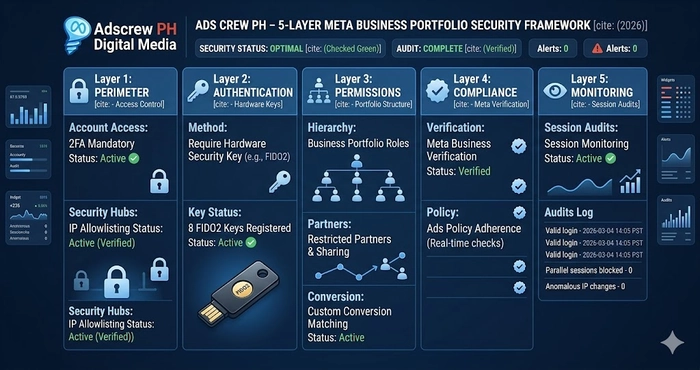
At Adscrew PH, we implement a “Fortress Architecture” for every client. This framework is designed specifically for Meta Business Manager 2FA bypass prevention.
Layer 1: The Authentication Apex (Hardware Keys)
The only way to stop session hijacking is FIDO2‑compliant hardware security keys (e.g., YubiKey 5 Series). These are phishing‑resistant because authentication is tied to the physical hardware and the specific domain (facebook.com). A stolen cookie is useless without the physical key to verify the session periodically. This is the cornerstone of prevention.
Layer 2: Permission Integrity (Least Privilege)
Most businesses have too many “Admins.” For effective prevention, follow the Principle of Least Privilege.
- Admins – strictly limited to the business owner + one trusted ops officer.
- Employees – daily media buyers get “Partial Access” only.
- Partners – agencies added via Partner ID, never as individual people. Essential for Meta Business Manager setup for agency scaling.
Layer 3: Environment Hardening (The “Security Key Ceremony”)
When onboarding a new admin, perform a Security Key Ceremony: issue hardware keys and remove all other 2FA methods (SMS, authenticator app).
Layer 4: Continuous Session Monitoring
Meta provides a “Where You’re Logged In” dashboard. A core part of prevention is a weekly audit of these sessions. Use tools like Metricool to monitor technical signals.
Layer 5: Incident Response & Redundancy
If a breach occurs, you need a lifeboat. That’s where a redundant meta ad account structure for high risk becomes invaluable.
Step‑by‑Step: How to Set Up Bulletproof 2FA for Meta Business Manager
Follow this exact SOP to harden your account against 2026 threats.
- Go to Business Settings > Security Center.
- Set 2FA to “Everyone” – no weak links.
- Add Your Security Key – plug in your YubiKey and register it as the primary 2FA method. This is the ultimate step in Meta Business Manager 2FA bypass prevention.
- Download Recovery Codes – these are your “Master Keys.” Save them in an encrypted password manager (1Password/Bitwarden).
- Audit System Users – Settings > Users > System Users. Hackers often create a “System User” to maintain permanent access. Remove any you don’t recognize.
Why “Andromeda” Rewards Secure Portfolios
In 2026, Meta’s algorithm includes a Trust Score. A portfolio with hardware‑level Meta Business Manager 2FA bypass prevention signals high legitimacy to the AI.
- Faster Approvals – Secure accounts often bypass initial “AI Flagging” on standard creatives.
- Higher Spend Limits – Meta is more comfortable allowing high daily spends (₱1,000,000+) on hardware‑verified portfolios.
- Better Delivery – Higher trust scores often correlate with lower CPMs. For more 2026 AI trends, see LSEO’s Meta Ads 2026 Guide.
The 2026 Security Audit Checklist (Use Every 30 Days)
Use this checklist monthly:
System Users – Any unknown API‑based accounts?
Admin Audit – Are there more than 2 full admins?
Session Review – Are all active sessions on recognized devices?
2FA Method – Is anyone still using SMS?
Partner Audit – Are all agencies added via Partner ID and appropriate permission levels?
Recovery Codes – Are they stored safely offline?
20‑Question FAQ: Secure Meta Business Portfolio from Unauthorized Access
Where can I learn more about Meta security best practices?
Start with the Meta Business Help Center and CISA’s phishing‑resistant MFA guidance.
What is the most common 2FA bypass method in 2026?
Pass‑the‑Cookie session hijacking. Attackers steal your logged‑in browser session and bypass the 2FA prompt entirely.
Can a hacker bypass YubiKey?
Not through remote phishing. YubiKey uses FIDO2, which is bound to the specific domain. A fake site cannot harvest the credential.
How do I know if my Meta session has been hijacked?
Check “Where You’re Logged In” in Security Center. Look for unknown devices, locations, or times.
What is a “pass‑the‑cookie” attack in simple terms?
A hacker steals your browser’s “remember me” cookie, imports it into their browser, and Meta thinks they are you.
Does SMS 2FA protect me?
No. SIM swapping makes SMS dangerous. Remove it as an option.
How often should I audit my Business Portfolio sessions?
At least once every 7 days. Weekly.
What is the Principle of Least Privilege?
Give users only the permissions they absolutely need – no more. Most people should not be Admins.
What are Meta Work Accounts?
They decouple access from personal Facebook profiles, reducing risk from personal account compromises.
Can I use Google Authenticator instead of a hardware key?
It’s better than SMS but still vulnerable to malware that steals TOTP seeds. Hardware keys are superior.
Does Meta have a bug bounty program for 2FA bypass?
Yes – Meta’s White Hat program pays for reporting security flaws.
How do I remove a hacker’s session from my portfolio?
Go to Security Center → “Where You’re Logged In” → force logout all unknown sessions. Then revoke any unrecognized System Users.
What is a System User?
An API‑based account that can manage assets programmatically. Hackers create them to retain backdoor access.
Should I use the same credit card across multiple portfolios?
No. That creates a “chain infection” risk. Use virtual cards with unique numbers. See our guide on payment redundancy.
What is a “Security Key Ceremony”?
A process where you issue hardware keys to new admins and disable all other 2FA methods.
Can I use a YubiKey with my phone for Meta Business Suite?
Yes – YubiKey 5C NFC works with iPhone/Android via NFC or USB‑C.
How does Meta’s Andromeda AI use trust scores?
Andromeda assigns higher “Account Integrity” to portfolios with hardware 2FA, leading to faster approvals and higher spend limits.
What should I do immediately after a suspected breach?
Log out all sessions, remove unknown System Users, change passwords, and deploy your backup (redundant) ad account.
Are recovery codes safe in the cloud?
No – store them offline (printed) or in an encrypted vault like 1Password.
How do I add a partner agency without giving them admin access?
Use Partner ID sharing. Grant only “Ad Account” or “Page” access, not full portfolio admin.
Conclusion: Security is Your Greatest Competitive Advantage
In an era of AI‑driven threats, Meta Business Manager 2FA bypass prevention is no longer a luxury – it is a requirement for survival. By treating your Business Portfolio as a high‑value financial asset and implementing a hardware‑first security strategy, you protect your revenue, your data, and your clients.
At Adscrew PH, we believe the best media buying is useless if the account is fragile. Secure your foundation today so you can scale with confidence tomorrow.
Related Adscrew PH guides (topic cluster):
- Redundant Meta Ad Account Structure for High Risk
- Meta Ads KPI Alignment Strategy: MER vs. ROAS Blueprint
- How to Build High‑Converting Audiences
Final High‑Converting CTA
Is Your Ad Spend Safe from 2026 Hackers?
A single “cookie theft” could end your scaling journey today. Don’t wait for the red banner.
Partner with Adscrew PH to:
- Implement a professional Meta Business Manager 2FA bypass prevention audit.
- Secure your Business Portfolio with FIDO2 hardware keys.
- Audit your Meta ads permission levels for external partners.
What clicked for me was Master Meta Business Manager 2FA Bypass Prevention in 2026 — more useful than the headline alone. Off-topic but worth a bookmark: writingpromptgenerator.net, a writing prompt generator.