
Table of Contents
Summary: Meta Ad Payment Method Disabled Fix
In 2026, a Meta ad payment method disabled status is primarily triggered by Signal Mismatches detected by the Andromeda AI, such as BIN/Country discrepancies, Insufficient Funds (Threshold Failures), or Bank-side Fraud Blocks. To execute a successful fix, advertisers must first Whitelist Meta with their financial institution before attempting to add a fresh, verified business credit line. Structural stability is achieved by implementing Billing Redundancy (Primary and Secondary methods) and maintaining a 20% Liquidity Buffer over the current billing threshold. High-spend agencies can further mitigate risk by requesting a Manual Threshold Reset to smaller, frequent increments, ensuring “Signal Continuity” and preventing the 25-40% CPA spikes associated with delivery pauses.
Introduction: The High Cost of Billing Fragility
If your ads suddenly stop delivering and you see a flashing red billing error notification, you are not just facing a small technical glitch. You are experiencing a revenue interruption that can have cascading effects on your entire business. A proper Meta ad payment method disabled fix is about more than just swapping a card or clicking “Pay Now.” It is about understanding and repairing the technical signals that Meta’s Andromeda AI uses to judge the legitimacy of your business.
Direct Answer: A billing pause can spike your CPAs by 25‑40% for 48 hours because Meta’s AI loses real‑time optimization data.
In the high-velocity world of 2026 performance marketing, payment instability is a leading indicator of “Account Risk.” When a payment fails, Meta doesn’t just pause your ads; it lowers your account’s “Trust Score.” This can lead to increased manual reviews, restricted spend limits, and—most frustratingly—a complete reset of your Learning Phase once the ads are back online. To avoid these interruptions, advertisers must align with the official Meta Advertising Standards, which outline the platform’s rigorous expectations for financial integrity.
This guide provides the definitive blueprint for both immediate recovery and long-term prevention. You will learn the exact steps to execute a Meta ad payment method disabled fix, how to design a redundant billing architecture, and how to maintain the financial hygiene required to scale to seven figures without disruption.
Executive Overview: Billing as Risk Architecture
Most advertisers treat billing as a “back-office” task, focusing instead on creative hooks and audience segments. However, for agencies and high-growth brands, billing configuration is a core part of your Risk Architecture.
A weak billing structure leads to a “Chain Infection” of account issues. For example, if you have a proper Meta Ads account setup but your primary card fails three times in a row, Meta may flag your entire Business Portfolio as “High Risk.” This can trigger a secondary request for Meta business verification without documents or, in extreme cases, a permanent disable.
A professional Meta ad payment method disabled fix strategy requires a shift in mindset: billing is not just about paying for ads; it’s about providing the platform with consistent, reliable, and verified financial signals. As noted in recent Forbes e-commerce reports, proactive risk management is now the primary differentiator between brands that scale and those that fail due to technical friction.
Understanding Why Meta Disables Payment Methods
Before you can apply a Meta ad payment method disabled fix, you must diagnose the root cause. Meta’s automated systems rarely provide specific details, but 95% of failures fall into these five categories:
A. The “Insufficient Funds” Trap
This is the most common cause for smaller accounts. If your Billing Threshold hits $833 but your card only has $750, the charge fails. In 2026, Meta is less forgiving—three consecutive threshold failures can lead to the permanent disabling of that specific payment method. You can learn more about how thresholds evolve in this Meta Ad Threshold tutorial.
Direct Answer: Three consecutive threshold failures will permanently disable your payment method — always keep a 20% liquidity buffer.
B. Bank-Side “Fraud Detection”
As you scale, your transaction amounts increase. A bank that was comfortable with $83 charges may suddenly blocka $2,500 charge from “FACEBK ADS,” thinking your card was stolen. This is why a Meta ad payment method disabled fix often starts with a phone call to your bank manager rather than Meta support.
C. The “BIN” and Country Mismatch
Meta’s AI checks the Bank Identification Number (BIN) of your card. If your Business Portfolio is set to the Philippines but you are using a virtual card issued in the UK or USA, the “Location Signal” is broken. This mismatch is a major red flag for fraud.
D. Shared Card “Contagion”
Using the same credit card across 5 or 10 different ad accounts is a massive risk. If one of those accounts is banned for policy violations, Meta may “Blacklist” the card itself. Suddenly, every other account using that card will require a Meta ad payment method disabled fix.
E. Chargebacks and Disputes
This is the “Nuclear Option.” If you dispute a charge with your bank instead of resolving it with Meta, they will almost certainly disable your payment method and likely your entire ad account. Chargebacks are viewed as a total breach of trust. For deeper insights into payment security, see NMI’s guide on protecting payment operations.
Preventive Billing Configuration Framework
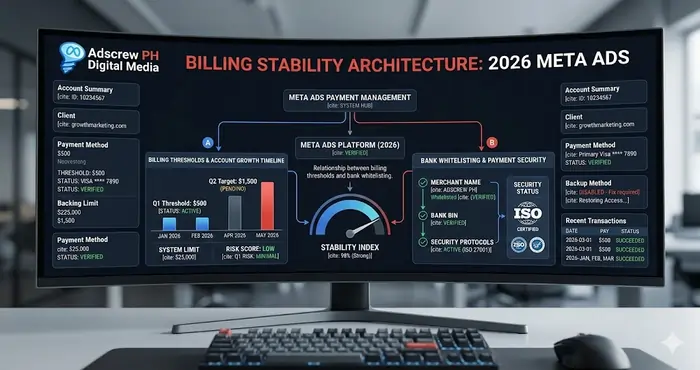
The best Meta ad payment method disabled fix is the one you never have to perform. By engineering your billing for stability, you ensure your Meta Business Manager setup for agency scaling remains uninterrupted.
Step 1: Use Dedicated Business Credit Lines
Avoid using personal debit cards for high-spend accounts. Business credit cards generally have higher “Authorized Transaction” limits and are more “Trust-Verified” by Meta’s AI.
Step 2: Implement Billing Redundancy
Every ad account should have at least two payment methods:
- Primary: Your main business credit card.
- Secondary: A backup card or a verified PayPal account. This ensures that if the primary fails, the backup can process the charge automatically, preventing a delivery pause. This is a core part of a redundant Meta ad account structure for high risk. Many top agencies use Revolut Business for creating isolated virtual cards for specific ad accounts.
Direct Answer: Billing redundancy means having a secondary payment method that auto‑charges when the primary fails — it prevents delivery pauses entirely.
Step 3: Monitor Threshold Behavior
Meta’s billing thresholds are dynamic. They increase as you pay successfully.
- Starting: $17
- Mid-Level: $417
- High-Level: $833+
If you know your threshold is about to hit, ensure your card has a “Liquidity Buffer” that is 20% higher than the threshold amount.
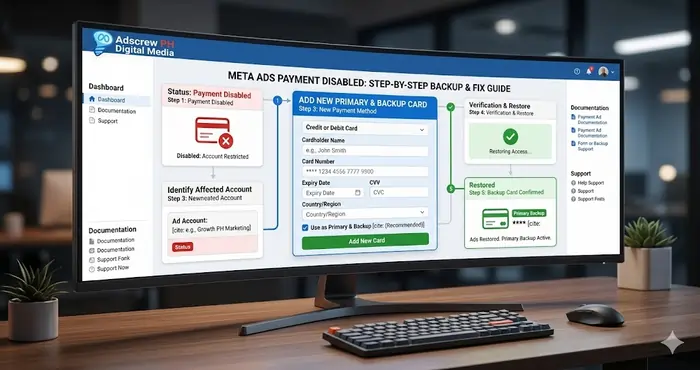
Meta Ad Payment Method Disabled Fix: The 5‑Step Recovery Workflow
If you are currently looking at a “Disabled” status, follow this exact SOP to restore delivery.
Step 1: The “Financial Cleanup”
Do not try to re-add the same card immediately. First, call your bank and ask: “Was a transaction from Meta/Facebook blocked today?” If yes, tell them to whitelist all future charges from Meta. This is the most critical part of a successful Meta ad payment method disabled fix.
Step 2: Add a Fresh Payment Method
Navigate to Business Settings > Billing & Payments. Instead of trying to “Fix” the old card, add a completely new, verified payment method. Set this as your Primary method.
Step 3: Clear the Outstanding Balance
Once the new card is added, click the “Pay Now” button in Ads Manager. You must clear the debt before Meta will allow the “Disabled” flag to be reviewed.
Step 4: Remove the “Corrupted” Asset
Once the balance is clear and ads are running again, remove the old, disabled card from your portfolio. This prevents the “High Risk” signal from lingering on your account.
Step 5: The “Trust Audit”
Check your Meta ads permission levels for external partners. Ensure that only verified “Finance Admins” have the power to change billing settings. Unauthorized changes by unverified users can often trigger a payment disable. For a comprehensive look at account security, refer to Meta’s Business Help Center.
Advanced Stability: The “Manual Threshold Reset” Hack
For high-spend agencies, an **833∗∗thresholdcanbealiability.Ifachargeof833 fails at 2:00 AM, your ads stop for 6 hours until you wake up.
The Solution: You can contact Meta Support and request a “Manual Threshold Lowering.” By setting your threshold to a smaller, more frequent amount (e.g., $167), you ensure that even if one charge fails, the “Debt” is small and easier to clear without triggering a system-wide “Risk Flag.” This is a high-level Meta ad payment method disabled fix that most amateurs don’t know exists. You can see this discussed in recent 2026 Ads Manager updates.
Direct Answer: A manual threshold reset to smaller increments (e.g., $167) reduces the damage of a single failed charge and prevents your account from being flagged as high risk.
Why Billing Stability is Essential for 2026 Scaling
In 2026, the Meta algorithm prioritizes “Signal Continuity.” Every time your ads pause due to a billing issue, the AI loses its “Real-Time Optimization” data.
- The Damage: CPAs often spike by 25-40% for the first 48 hours after a billing-related pause.
- The Solution: Maintaining a perfect payment history acts as a “Trust Multiplier” for your account, often resulting in faster ad approvals and lower CPMs.
This is why how to run Meta Ads at an elite level is 50% creative strategy and 50% infrastructure management. To keep track of these metrics across accounts, many professionals use Metricool for Meta Ads.
Summary: The Billing Stability Checklist
To avoid ever needing another Meta ad payment method disabled fix, ensure you can check these four boxes:
- Redundancy: I have at least two verified payment methods.
- Verification: My billing country matches my card’s issuing country.
- Liquidity: My cards have a 20% buffer over my current threshold.
- Professionalism: I use business-grade credit lines, not personal debit cards.
Conclusion: Protect the Pipeline
Billing stability is growth stability. When you master the Meta ad payment method disabled fix, you are protecting your revenue pipeline from unnecessary friction. Whether you are an agency managing dozens of clients or a brand looking for Meta Ads for small business success, your financial infrastructure is the bedrock of your performance. For a visual walkthrough of the latest 2026 billing UI, check out this Meta Ads 2026 Tutorial.
Key Takeaways
- A disabled payment method kills signal continuity: Your CPA can spike 25‑40% for 48 hours after a billing pause.
- Never start with the same card: Call your bank to whitelist Meta before re‑adding any payment method.
- Redundancy is non‑negotiable: A secondary card or PayPal auto‑charges when the primary fails — no downtime.
- Country mismatches trigger fraud flags: Your card’s BIN must match your Business Portfolio’s location.
- The manual threshold reset is a secret weapon: Lower your threshold to $167 so a single failure doesn’t tank your account.
- Shared cards spread risk like a virus: One banned account can blacklist your card for every other account.
- Chargebacks are the nuclear option: Disputing a Meta charge = permanent payment method disable + high risk of account ban.
Frequently Asked Questions (20)
Q1: How long does it take to fix a disabled Meta ad payment method?
A: 30 minutes to 24 hours — depending on how fast your bank whitelists Meta and you add a fresh card.
Q2: Can I use a virtual card for Meta Ads?
A: Yes, but only if the BIN/country matches your portfolio and the card is not shared across banned accounts.
Q3: Why does Meta keep disabling my card even with funds?
A: Bank fraud detection — you must call your bank and ask them to whitelist “FACEBK ADS” transactions.
Q4: What is a BIN mismatch?
A: Your card’s first 6 digits (Bank Identification Number) indicate country of issue. If it differs from your Meta business location, the AI flags it as fraud.
Q5: Will removing the disabled card fix the problem?
A: No — you must first clear the outstanding balance with a new card, then remove the old one.
Q6: How many payment method failures before Meta disables the account?
A: Three consecutive threshold failures typically disable the payment method; 5+ failures across methods can trigger account review.
Q7: Does PayPal work as a reliable backup?
A: Yes — verified business PayPal accounts are excellent secondary methods, but ensure sufficient balance.
**Q8: What’s the ideal billing threshold for a 50k/monthspender?∗∗A:167–$417 (small, frequent charges) to minimize damage from a single failure.
Q9: Can a billing pause reset my Learning Phase?
A: Yes — any delivery pause longer than 7 days resets Learning; even 24‑48 hour pauses hurt optimization.
Q10: Does Meta support offer real‑time billing help?
A: Only for accounts with >$8,300 monthly spend. Lower spenders must rely on automated forms.
Q11: How do I know if my card is blacklisted by Meta?
A: You can’t see it directly. If a brand new, funded card gets immediately disabled, it’s blacklisted.
Q12: Can I use a co‑branded card (e.g., GrabPay, GCash Amex) for Meta Ads?
A: Rarely — most pre‑paid or quasi‑bank cards fail the BIN verification. Stick to real business credit cards.
Q13: What’s the 20% liquidity buffer rule?
A: If your threshold is 833,keepatleast1,000 available. The extra 20% covers unexpected threshold increases.
Q14: Does Meta charge immediately or after threshold?
A: Threshold billing: Meta charges after you reach a preset spend limit (17,417, $833). Manual “Pay Now” charges instantly.
Q15: Will switching to manual payment prevent disables?
A: No — manual payments are worse because you can forget to pay. Automatic threshold + redundancy is best.
Q16: My card works on other platforms but not Meta — why?
A: Meta’s AI uses stricter BIN/country/chargeback databases than most platforms. Your bank may block Meta specifically.
Q17: Can a billing issue affect my Business Manager, not just the ad account?
A: Yes — repeated failures can flag the entire Business Portfolio as high risk, affecting all ad accounts under it.
Q18: How do I request a manual threshold reset?
A: Contact Meta Support via Ads Manager help chat. Say: “I need to lower my billing threshold to [amount] for stability.” Provide 3 months of clean payment history.
Q19: What’s the fastest way to get ads running again after a disable?
A: Step 1: Call bank to whitelist Meta. Step 2: Add a different card. Step 3: Pay balance. Do not reuse the failed card.
Q20: Is it worth using a third‑party billing aggregator for Meta Ads?
A: For agencies with >10 accounts, yes — tools like Strike or AdSpend isolate cards per account, preventing “Shared Card Contagion.”