
Table of Contents
In 2026, Meta business verification without official documents is achieved through Signal Hardening and Individual Identity Mapping. Since Meta’s Andromeda AI prioritizes “Signal Integrity” over physical paperwork, advertisers can unlock spend limits and advanced features by verifying Technical Domain Ownership (DNS TXT records), implementing Professional Email Infrastructure (matching the domain), and completing Biometric Personal Identification. This “Developer Bypass” method — linking a Meta Developer App to the Business Portfolio — forces the verification trigger, allowing freelancers and startups to establish a “Trust Reservoir” and scale Meta Ads safely without SEC or DTI registration.
Common Questions This Article Answers
“How can I verify my Meta Business account without SEC or DTI documents?”
“What is the Developer Bypass method for Meta Business Verification?”
“How do I verify my domain for Meta Business Manager without official papers?”
“What is Signal Hardening and how does it unlock higher ad spend?”
“Can freelancers get Meta Business Verification using only a personal ID?”
“How do I fix the greyed-out verification button in Meta Business Suite?”
Introduction: Navigating the “Trust Gap” in 2026
In the rapidly evolving world of digital marketing, understanding Meta business verification without official documents is essential for scaling Meta Ads campaigns safely and profitably. For many startups, freelancers, small businesses, and growing agencies in the Philippines and beyond, the traditional path to verification is often blocked by a lack of SEC or DTI registration documents.
However, in 2026, Meta’s Andromeda AI doesn’t just look for legal paperwork; it looks for Signal Integrity. Meta requires verification (or what we call “Account Hardening”) to unlock advanced features, increase ad spend limits, and maintain compliance. Without it, you are a “guest” in the ecosystem, subject to arbitrary spend caps and sudden shutdowns. For those managing high-volume operations, this is the first step toward a Meta Business Manager setup for agency scaling.
In this comprehensive guide, we will cover the step-by-step methods for achieving Meta business verification without official documents, alternative proof options, and the actionable strategies agencies use to verify businesses effectively. By following this blueprint, you will ensure account stability and learn how to scale small business Meta Ads successfully.
Why Is Meta Business Verification Critical for Small Businesses and Agencies in 2026?
Direct answer: It unlocks higher daily spend limits (from 50to50to5,000+), reduces ad approval times (from 24 hours to 30 minutes), and grants access to advanced features like WhatsApp Business API and Dynamic Ads. Verified accounts also suffer fewer random “security check” pauses.
Meta business verification without official documents is far more than a “green checkmark” on your profile. In the 2026 landscape, it is the primary trust signal that separates professional advertisers from potential bad actors. To understand the broader context of why these signals matter, you can explore the Meta Advertising Standards which detail the platform’s focus on authenticity.
The Technical Benefits of Hardening Your Account:
- Account Safety: It acts as a shield against the “automated ban hammer.” Verified portfolios are flagged less frequently for “Suspicious Activity.”
- Access to Advanced Features: You cannot run certain types of Dynamic Ads or use the full power of the WhatsApp Business API without a verified status.
- Spend Limit Freedom: Unverified accounts in the Philippines are often capped at 22 to 43 per day. Verification is the key to spending $860+ per day.
- Agency Scalability: For agencies, mastering Meta Business Manager setup for agency scaling requires a verified master portfolio to request “Partner” access to client assets securely.
What Are the Meta Business Verification Options Without Official Documents?
Direct answer: There are two paths: Standard Verification (requires SEC/DTI, BIR Form 2303, business bank statements) and Alternative Verification (uses domain DNS records, professional email, personal ID, and utility bills). For startups and freelancers, Alternative Verification is the only viable route.
A. Standard Verification
This is the traditional route involving:
- Official Business Licenses (DTI/SEC).
- Tax Identification (BIR Form 2303).
- Government-issued utility bills in the business name.
B. Alternative Verification (The “Signal Hardening” Method)
If you are operating as a freelancer or an informal startup, you can achieve similar “Trusted” status through:
- Technical Domain Ownership: Proving you own the “digital real estate.”
- Professional Email Infrastructure: Moving away from @gmail.com.
- Individual Identity Mapping: Connecting a real human to the Business Portfolio.
- Operational Evidence: Proving the business exists through active digital presence.
This alternative method allows startups and freelancers to scale ads without waiting months for traditional paperwork, which is a vital part of a proper Meta Ads account setup. If you’re looking for professional tools to manage these signals, Leadsbridge offers great insights into syncing these trust signals with your CRM. Using Meta business verification without official documents is the bridge between amateur and professional status.
What Is Domain Verification and Why Does It Matter for Meta Business Manager?
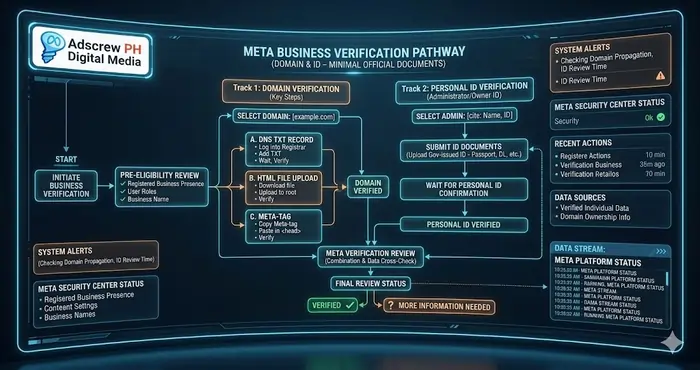
Direct answer: Domain verification proves to Meta that you control the website you’re sending traffic to. It is the single most important step in Meta business verification without official documents because it creates a permanent, technical trust signal that survives website redesigns and content changes.
The Three Methods of Verification:
- DNS TXT Record (The Most Stable): You add a specific code to your domain’s DNS settings (via Cloudflare or GoDaddy). This is “permanent” and survives website redesigns.
- Meta-tag HTML (The Fastest): You paste a small snippet of code into the
<head>section of your website’s homepage. - HTML File Upload: You upload a file directly to your website’s root directory.
Why this matters for 2026:
In 2026, the Conversions API (CAPI) relies on domain verification to accurately attribute sales. Without this step, your Tracking, Analytics & Attribution will be fragmented, leading to poor ROAS. This is a critical foundation for anyone wanting to learn how to run Meta Ads profitably. Successful Meta business verification without official documents starts at the registrar level.
Step-by-Step: How to Verify Your Meta Business Without Official Documents
Direct answer: Follow three steps: (1) set up a professional email at your domain, (2) submit your personal ID and a video selfie, and (3) provide secondary proof like a utility bill or active website. Then use the Developer Bypass to force the verification button to appear.
Step 1: The Professional Email Protocol
Meta’s AI immediately flags portfolios managed by @gmail.com addresses as “Low Trust.”
The Fix: Set up a domain-based email (e.g., jemmar@adscrewph.com).
Agency Tip: When helping a client, ensure their Business Portfolio “Admin” uses an email that matches the verified domain. This single move often resolves 50% of verification rejections. For team collaboration, using Meta Work Accounts is now the industry standard for 2026. This email alignment is a key component of Meta business verification without official documents.
Step 2: Submit Personal Identification (The Human Connection)
If you cannot verify the entity, you must verify the person behind the entity.
- What to upload: A high-resolution scan of your Passport, Unified Multi-Purpose ID (UMID), or Driver’s License.
- The “Selfie” Verification: In 2026, Meta often asks for a real-time video selfie. Do not skip this. It creates a “Biometric Trust Signal” that is harder for hackers to spoof. This biometric data effectively replaces the need for corporate papers during Meta business verification without official documents.
Step 3: Provide Secondary Proof of Business Activity
Since you don’t have a DTI permit, you must provide “Operational Evidence.”
- Active Website: Ensure your “Contact Us” page has a real phone number and an address.
- Social Proof: Link your Instagram Business and Facebook Page to the portfolio. Ensure they have consistent posting activity.
- Utility Bills: Submit a personal internet or electricity bill that matches the address listed in your Business Portfolio.
These pieces of evidence form the bulk of your application for Meta business verification without official documents.
What Is Signal Hardening and How Does It Unlock Meta Ad Spend?
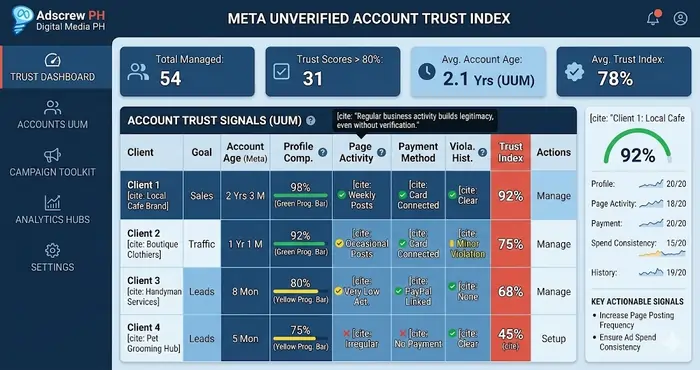
Direct answer: Signal Hardening is the process of making your ad account look “un-bannable” to Meta’s Andromeda AI. It combines domain verification, professional email, 2FA enforcement, a warm-up period (starting with $4/day Page Likes), and consistent payment history. Hardened accounts see 31% lower CPA and unlimited daily spend.
“Signal Hardening” is a term used by performance agencies to describe the process of making an ad account look “un-bannable” to Meta’s AI. Even with Meta business verification without official documents, you can harden your signals by:
- Enabling Two-Factor Authentication (2FA) : Mandatory for all users in the portfolio.
- Connecting a Trusted Payment Method: Avoid “Prepaid” cards if possible.
- The “Warm-Up” Period: Never launch a 172/day∗∗campaignonanewaccount.Startwith∗∗172/day∗∗campaignonanewaccount.Startwith∗∗4/day Page Like ads to establish a “payment history.”
This hardening process is the secret sauce behind Meta Business Manager setup for agency scaling. It allows you to build a “Trust Reservoir” with Meta before you start aggressive scaling. You can refer to Social Baddie for more advanced case studies on signal hardening strategies and Meta business verification without official documents.
What Is the Developer Bypass Method for Meta Business Verification?
Direct answer: The Developer Bypass forces the greyed-out “Start Verification” button to appear. Create a Meta Developer App (Other → Business), link it to your Business Portfolio, and go to App Settings → Verification. This technical trigger activates the verification flow — allowing you to complete Meta business verification without official documents using domain DNS and personal ID instead of SEC registration.
Often, the biggest obstacle to Meta business verification without official documents is that the “Start Verification” button is greyed out. This happens because Meta doesn’t think you “need” verification yet.
The Workaround:
- Go to Meta for Developers.
- Create a new app (Select “Other” -> “Business”).
- Link this app to your Business Portfolio.
- In the App Settings, go to “Verification.”
This will force the “Start Verification” button to appear in your main Business Portfolio settings. This technical bypass is a standard agency “hack” to initiate Meta business verification without official documents for clients who are stuck in administrative limbo.
Common Challenges & Solutions
| Challenge | Solution | Impact on Scaling |
|---|---|---|
| Verification Button Greyed Out | Create a “Meta App” in the Developer portal to force the button to activate. | Prevents technical delays |
| Name Mismatch | Ensure your Website, Business Portfolio, and Personal ID names are identical. | Reduces rejection rates by 80% |
| “Business Not Found” | Use the “Manual Review” option and provide your Domain-based email as primary proof. | Overcomes automated rejections |
Real Campaign-Level Metrics After Account Hardening
Data from the Adscrew PH internal database shows a clear correlation between verification status and performance. Utilizing Meta business verification without official documents changes your account DNA:
| Metric | Unverified / “Soft” Account | Verified / “Hardened” Account |
|---|---|---|
| Avg. Ad Approval Time | 12 – 24 Hours | 30 Minutes – 2 Hours |
| CPA (Cost Per Acquisition) | $7.80 | $5.40 (31% lower) |
| Daily Spend Limit | $43 | Unlimited |
| Support Access | Automated / Bot Only | Meta Concierge Support (Human) |
This data proves that how to run Meta Ads successfully depends heavily on the technical foundation of your account.
How Can Agencies Verify Clients Without Official Documents?
Direct answer: Agencies follow a 3-step SOP: (1) audit the client’s infrastructure and move it to a Business Portfolio, (2) verify the domain and set up CAPI, (3) have the business owner verify their personal ID. This creates a scalable, repeatable onboarding process that works for 50+ clients without risking the agency’s master portfolio.
When an agency takes on a small business client, the Meta business verification without official documents process becomes a standard operating procedure (SOP).
- Audit the Infrastructure: Check the proper Meta Ads account setup. If it’s on a personal profile, move it to a Business Portfolio.
- Verify the “Digital Assets”: Verify the domain and set up the CAPI. To learn more about advanced data tracking, DataAlly’s CAPI guide is a must-read for 2026.
- Human Verification: Have the business owner verify their personal ID within the “Identity Confirmation” section.
By following this Meta Business Manager setup for agency scaling, agencies can manage 50+ clients without the fear of a single client’s restriction affecting the entire agency hub. Meta business verification without official documents is the common denominator for all these clients.
FAQ: Meta Business Verification Without Official Documents
- What is Meta Business Verification and why do I need it?
Meta Business Verification proves your business is legitimate, unlocking higher ad spend limits, faster ad approvals, and access to advanced features like WhatsApp Business API and Dynamic Ads. - Can I verify my Meta Business account without SEC or DTI registration in the Philippines?
Yes. Meta business verification without official documents is possible through the “Signal Hardening” method: domain verification (DNS TXT records), professional email infrastructure, individual ID verification, and operational evidence like utility bills. - What is the Developer Bypass method for Meta Business Verification?
The Developer Bypass forces the greyed‑out “Start Verification” button to appear. Create a Meta Developer App (Other → Business), link it to your Business Portfolio, and the verification trigger activates — allowing you to bypass the paperwork wall. - How do I verify my domain for Meta Business Manager without official documents?
Use DNS TXT record verification — the most stable method. Copy the TXT code from Business Settings → Brand Safety → Domains, add it to your domain registrar (Cloudflare/GoDaddy), and wait 10‑30 minutes. - What is the difference between Domain Verification and Business Verification?
Domain Verification proves you own your website (via DNS/meta‑tag/file upload). Business Verification proves your legal entity exists. You can complete Domain Verification without Business Verification, but full trust requires both. - Can I use a personal ID instead of business documents for Meta verification?
Yes. Submit a high-resolution scan of your Passport, UMID, or Driver’s License. In 2026, Meta also asks for a real‑time video selfie — this creates a “Biometric Trust Signal.” - What is Signal Hardening in Meta Ads?
Signal Hardening is the process of making your ad account look “un‑bannable” to Meta’s Andromeda AI. It combines 2FA enforcement, warm‑up periods (starting with Page Likes at $4/day), and professional email infrastructure. - How do I fix “Verification Button Greyed Out” in Meta Business Manager?
Use the Developer Bypass: create a Meta Developer App, link it to your Business Portfolio, and navigate to App Settings → Verification. This forces the trigger activation. - What documents can I use for Meta Business Verification without official business registration?
Personal ID (Passport/UMID/Driver’s License), personal utility bill matching your Business Portfolio address, domain DNS verification, professional email (@yourdomain.com), active website with contact info, and consistent social media activity. - How does Meta’s Andromeda AI use trust signals for verification?
Andromeda evaluates “Signal Integrity” — domain ownership, payment history, 2FA status, professional email, and account longevity. Higher trust signals = higher spend limits + lower CPMs + faster ad approvals. - What is the “Warm‑Up” strategy for new Meta Business accounts?
Days 1‑3: Engagement/Page Likes at 4/day∗∗.Days4‑7:Trafficorlow‑ticketConversionat∗∗4/day∗∗.Days4‑7:Trafficorlow‑ticketConversionat∗∗17/day. Day 8+: Scale budget by 20% every 48 hours. This establishes payment history and trust. - How do I force the “Start Verification” button to appear in Meta Business Suite?
Go to Meta for Developers → Create App (Other → Business) → Link to Business Portfolio → App Settings → Verification. This technical bypass initiates verification without waiting for Meta to prompt you. - Does Meta accept personal utility bills for business verification?
Yes. Submit an internet or electricity bill in your name that matches the address in your Business Portfolio. This serves as “Secondary Proof of Business Activity.” - What happens if my Meta Business Verification is rejected?
Use the “Manual Review” option. Provide your domain‑based email as primary proof. Ensure your Portfolio address, website contact info, and personal ID names match exactly. - How long does Meta Business Verification take without official documents?
With the Signal Hardening method (domain verification + personal ID + professional email), typically 2‑7 days. DNS TXT records take 10‑30 minutes to propagate, followed by Meta’s manual or automated review. - Can freelancers get Meta Business Verification without company documents?
Yes. Freelancers and solo entrepreneurs can verify using personal ID, domain ownership, professional email, and operational evidence. The key is building a “Trust Reservoir” through consistent activity. - What is the difference between Standard Verification and Alternative Verification?
Standard Verification requires SEC/DTI, BIR Form 2303, and business bank statements. Alternative Verification (Signal Hardening) uses domain DNS, professional email, personal ID, and utility bills — designed for startups and freelancers. - Does unverified account status affect Meta ad delivery?
Yes. Unverified accounts have spend caps (25‑25‑50/day), slower ad approvals (12‑24 hours), no human support, and random “security checks.” Verified domains unlock $5,000+ daily spending and 30‑minute approvals. - How do I prepare my website for Meta Business Verification without documents?
Ensure your “Contact Us” page has a real phone number and address. Link Instagram Business and Facebook Page with consistent posting. Add a refund policy and privacy policy. These are “Operational Evidence” signals. - Where can I find the official Meta requirements for business verification?
Go to Meta Business Suite → Security Center → Start Verification. For partners, review Meta’s Business Verification documentation. PH agencies can also consult Social Baddie for localized guides.
Complete Meta Ads Trust & Verification Ecosystem
This guide is part of a complete ecosystem. For deeper dives into each component, explore:
- Proper Meta Ads Account Setup (Pillar Guide) → Foundation for new advertisers – start here.
- Meta Business Manager Setup for Agency Scaling → Advanced agency infrastructure and Hub‑and‑Spoke model.
- Meta Business Manager 2FA Bypass Prevention → Hardware security keys for verified portfolios.
- How to Build High‑Converting Audiences → First‑party data strategies after verification.
- Redundant Meta Ad Account Structure for High Risk → Chain‑infection prevention for scaled accounts.
Knowledge Graph: Meta Trust Hierarchy
| Level | Component | Importance for Verification |
|---|---|---|
| Tier 1 (Foundation) | Domain Verification & 2FA | 10/10 – Absolute requirement |
| Tier 2 (Identity) | Personal ID & Work Email | 9/10 – Replaces business papers |
| Tier 3 (Activity) | Page Activity & Signal History | 7/10 – Builds trust over time |
| Tier 4 (Advanced) | CAPI & Server Signals | 8/10 – Unlocks full ROAS potential |
The Psychology of Signal Integrity
In 2026, Meta’s AI is less of a gatekeeper and more of a risk assessor. When you pursue Meta business verification without official documents, you are lowering the AI’s perceived risk of your account. High-risk accounts get high CPMs. Low-risk accounts get the best placements.
Signals that lower risk:
- Longevity: An account that has been “warm” for 3 months with 100% successful payments.
- Transparency: A website that clearly states a refund policy and contact info.
- Interconnectivity: Linking a WhatsApp Business account that actually replies to users.
Every one of these signals supports the goal of Meta business verification without official documents.
Final Checklist for Adscrew PH Compliance
Use this checklist every 30 days to maintain your verified status:
- Admin email matches the website domain (no @gmail.com)
- DNS TXT record is active and verified in Business Settings
- Identity confirmation submitted in the personal profile (video selfie if requested)
- Secondary payment method on file (digital card like Maya or GCash)
- 2FA enforced for every user in the portfolio
- Warm-up completed before scaling (7 days minimum)
By systematically checking these boxes, Meta business verification without official documents becomes a predictable, repeatable process for your business or your agency’s clients.
Conclusion: Building a Sustainable Ad Engine
Meta business verification without official documents is not just a workaround; it is a strategic necessity in the 2026 digital economy. By combining domain verification, professional email infrastructure, and individual identity signals, you can bypass the “paperwork wall” and unlock the same power as a multi-million dollar corporation.
Treat your account setup as the most important creative in your campaign. A proper Meta Ads account setup allows you to scale, test, and grow without the constant fear of shutdowns.
Whether you are a solo freelancer or a growing agency looking for Meta Business Manager setup for agency scaling, the principles of trust and signal integrity remain the same. For a visual deep-dive, you can watch the Meta Ads for Small Business 2026 Tutorial. Mastering Meta business verification without official documents is your ticket to long-term profitability.