
Table of Contents
To scale an agency to 8 figures in 2026, Meta Business Manager setup for agency scaling must move to a Hub‑and‑Spoke model utilizing Meta Work Accounts. This architecture decouples personal profiles from business assets, ensuring security and privacy. Agencies must prioritize Business Verification, implement a Pixel + CAPI Nexus for server‑side signal integrity, and manage clients exclusively via Partner Access rather than internal ownership. This isolated infrastructure prevents “Policy Contagion,” stabilizes the Andromeda AI algorithm, and allows for rapid vertical scaling through high‑integrity data ecosystems.
Common Questions This Article Answers
“How do I set up Meta Business Manager for an agency with multiple clients?”
“What is the Hub‑and‑Spoke model for Meta agency management?”
“How do I transition my team to Meta Work Accounts in 2026?”
“What documents are required for Business Verification in the Philippines?”
“How do I share a Pixel with a partner agency without giving admin access?”
“What happens if a client’s Business Portfolio gets banned?”
Introduction: The Foundation of 8-Figure Agency Operations
For agencies that want predictable growth and maximum client ROI, mastering Meta Business Manager setup for agency scaling is non‑negotiable. In 2026, the digital landscape has shifted from manual audience “hacking” to Machine Learning (ML) signal integrity. Meta’s Business Manager—now officially transitioning to the Meta Business Portfolio—is the central nervous system of any high‑performing paid social operation.
When configured correctly, it enables the management of multiple ad accounts, structured permissions, sophisticated risk management, advanced tracking, and long‑term scaling. Improper setup is the most common cause of wasted budgets, tracking errors, policy violations, or even permanent account bans. This guide delivers an agency‑level blueprint, enriched with campaign‑level examples, performance metrics, and the new Meta Work Accounts technical protocols.
Whether you need a proper Meta Ads account setup for a new client or an audit of an existing structure, this blueprint serves as the definitive standard for Adscrew PH operations.
Why Does Proper Meta Business Manager Setup Matter for Agency Scaling in 2026?
Direct answer: It protects your agency from “Policy Contagion” and unlocks the Andromeda AI trust signals. A properly structured Business Portfolio isolates client risk, centralizes asset management, and rewards your agency with higher spend limits and faster ad approvals.
The stakes have never been higher. In a world dominated by Andromeda, the platform no longer rewards the advertiser who “knows the most hacks”; it rewards the advertiser who provides the cleanest data and the most stable infrastructure.
1. Centralized Asset Management & The Hub-and-Spoke Model
Why is the Hub‑and‑Spoke model the only way to scale a Meta Business Manager?
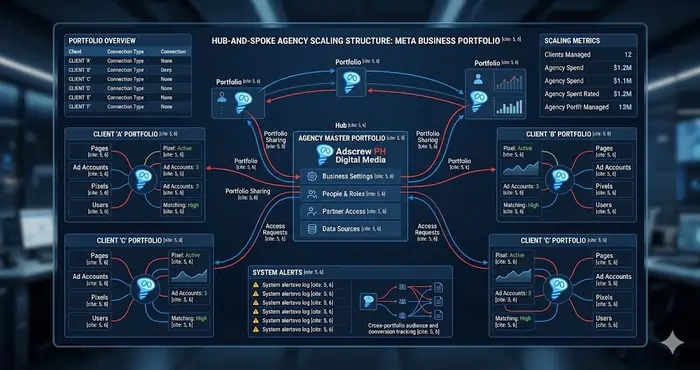
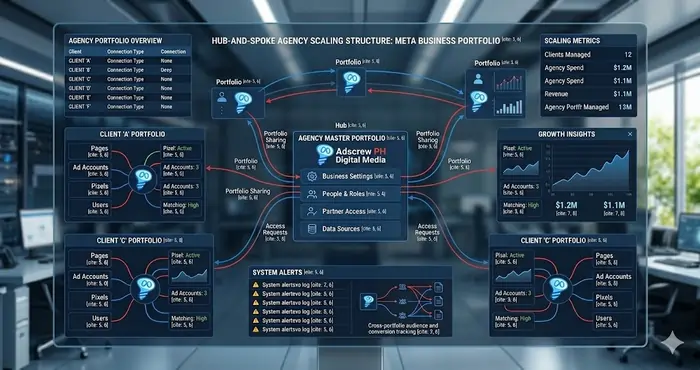
It isolates risk. Your agency acts as the Partner (Hub) while clients remain Owners (Spokes). If one client violates a policy, your entire agency portfolio—and your other clients—stay safe.
A well‑structured Business Portfolio allows you to control multiple client pages, ad accounts, pixels (Datasets), and catalogs from one dashboard. Without this structure, agencies face “Access Chaos,” where employees use personal logins to manage client money—a massive security risk.
Campaign Example: By implementing a Hub‑and‑Spoke model, one performance agency scaled 5 e‑commerce clients from 1,700to1,700to8,500 monthly ad spend each, purely by centralizing assets and reducing administrative friction.
2. Efficient Permissions & The Principle of Least Privilege
What is the Principle of Least Privilege in Meta Business Manager?
Assign only the permissions a user absolutely needs—no more. Giving everyone “Admin” access is a liability. In 2026, data security is a ranking and trust signal for Andromeda.
Campaign Insight: Assigning correct roles reduced ad set errors by 30% across a multi‑client setup by preventing accidental edits from junior staff.
The Foundation You Need First
Before you build a multi‑client agency infrastructure, you need a solid individual setup. This guide builds directly on our complete Proper Meta Ads Account Setup for Small Business Growth. That pillar guide covers the non‑negotiable basics: Business Portfolio Verification, Conversions API (CAPI) implementation, policy compliance, and why you must never run ads from a personal profile. If you haven’t read it yet, start there. This blueprint assumes you’ve already mastered that foundation.
Step 1: How Do You Transition a Team to Meta Work Accounts in 2026?
Direct answer: You stop inviting personal Facebook profiles and instead issue Work Account invitations to employees’ company email addresses. This decouples business access from personal privacy and eliminates “zombie” accounts when employees leave.
The biggest shift in 2026 is the decoupling of personal profiles from business assets through Meta Work Accounts. This is a cornerstone of modern Meta Business Manager setup for agency scaling. Previously, media buyers had to use their personal Facebook profiles to manage millions in ad spend—creating privacy issues, security vulnerabilities, and lingering access after departure.
How to Set Up Meta Work Accounts for Your Team:
- Navigate to your Business Portfolio settings → “Users” → “People.”
- Issue a Work Account invitation to the employee’s company email (e.g., name@adscrewph.com).
- The employee verifies their identity once at the agency level.
- If an employee leaves, simply deactivate their Work Account. No more rogue access.
This transition is a prerequisite for anyone learning how to run Meta Ads at a professional scale.
Step 2: What Documents Are Required for Business Verification in the Philippines?
Direct answer: For PH‑based agencies, Meta requires SEC or DTI registration, a utility bill matching your Business Portfolio address, and a BIR Certificate of Registration (Form 2303). Complete verification before requesting Partner access to client accounts.
Meta’s Andromeda algorithm rewards trust. Verified businesses enjoy higher daily spend limits, faster ad approvals, and priority support. Ignoring this step creates the “Grey Zone” —random restrictions during high‑traffic periods like Black Friday.
Documents Required for PH‑based Agencies:
- Business Identity: SEC or DTI registration (Certificate of Incorporation).
- Address Proof: Utility bill (Meralco/PLDT) or bank statement matching your Portfolio address.
- Tax Identity: BIR Certificate of Registration (Form 2303).
Expert Tip: Always complete your agency’s Business Verification before requesting Partner access. An unverified agency requesting access to a high‑spend client account is a major red flag for Meta’s fraud filters.
Step 3: How to Onboard Clients via “Partner” Access Without Risk
Direct answer: Never create a client’s ad account inside your own Business Manager. Instead, have the client create their own Portfolio, then add your Agency Business ID as a Partner. This isolates risk and prevents one client’s violation from affecting your entire agency.
If one client gets banned for a policy violation, every other client account in your Business Manager becomes “guilty by association.”
The Correct Onboarding Workflow for Scaling:
- Client Ownership: The client creates their own Business Portfolio.
- Agency Request: You provide your Agency Business ID.
- The “Partner” Relationship: The client adds you as a Partner and shares specific assets (Page, Ad Account, Dataset).
- Risk Segregation: A client violation stays within their spoke. Your Agency Portfolio remains healthy.
A professional Meta Business Manager setup for agency scaling depends on this isolation of risk.
Step 4: What Is the Billing Hierarchy Strategy for Uninterrupted Scaling?
Direct answer: Use a primary high‑limit credit card and a secondary digital card (e.g., Maya, GCash, PayPal). Set the ad account currency to match your local market. Audit billing weekly—a single payment decline resets the learning phase and kills momentum.
Scaling requires constant capital. A paused ad account due to a failed payment is the fastest way to kill Meta algorithm momentum.
The Billing Hierarchy Strategy:
- Primary Card: High‑limit corporate credit card.
- Secondary Backup: Separate digital card (Maya, GCash AMEX, or GrabPay) or PayPal.
- Currency Alignment: Match ad account currency to local market (e.g., USD for US, PHP for Philippines) to avoid 3–5% hidden conversion fees.
In your Meta Business Manager setup for agency scaling, audit billing weekly. A single decline can drop ROAS from 5x to 0x overnight.
Step 5: What Is the Pixel & Conversions API (CAPI) Nexus?
Direct answer: The Pixel + CAPI Nexus combines browser‑side tracking with server‑to‑server data sending. Due to cookie depreciation, browser‑only data is 30–40% inaccurate. CAPI bypasses ad blockers and privacy restrictions, improving reported ROAS by 25–30%.
In 2026, tracking is about Signal Liquidity. If your setup relies only on the browser pixel, you are flying blind.
The Setup Protocol:
- The Dataset: In the current Meta interface, Pixels are managed under Datasets. Create one unique Dataset per domain.
- CAPI Implementation: Use a server‑side gateway (Stape.io or Meta’s Cloud API) to send events directly to Meta’s servers.
- Event Prioritization: With Aggregated Event Measurement, prioritize “Purchase” and “Lead” events.
The Result: Agencies using the Pixel + CAPI Nexus typically see a 25–30% improvement in reported ROAS.
Step 6: What Is the Standard Naming Convention for Scaling?
Direct answer: Use a strict naming convention like [Agency_Code] | [Objective] | [Funnel_Stage] | [Offer_ID] | [Month_Year]. This enables bulk editing, automated rules, and fast optimization—preventing “The Fog of War” where media buyers waste time finding ads.
Consistency is the prerequisite for scaling. Without it, you cannot use automated rules or bulk‑edit effectively.
The Adscrew PH Standard Naming Convention:
- Campaign:
[Agency_Code] | [Objective] | [Funnel_Stage] | [Offer_ID] | [Month_Year] - Ad Set:
[Audience_Type] | [Placement] | [Bid_Strategy] | [Geo] - Ad:
[Creative_Format] | [Hook_Angle] | [Designer_Initial]
Example: ADS | Sales | TOF | 20OFF_MAR26 | Manila
Step 7: What Is the “Warm‑Up” Strategy for Agency Accounts?
Direct answer: You cannot go from 0to∗∗860/day** without triggering a ban. Follow a forced 7‑day warm‑up: Days 1–3 run Engagement campaigns (4/day∗∗),Days4–7run∗∗Traffic∗∗orlow‑ticket∗∗Conversion∗∗(∗∗4/day∗∗),Days4–7run∗∗Traffic∗∗orlow‑ticket∗∗Conversion∗∗(∗∗17/day), then scale 20% every 48 hours.
Professional Warm‑Up Phases:
- Phase 1 (Days 1–3): Engagement or Page Likes at $4/day – establishes payment history and trust.
- Phase 2 (Days 4–7): Traffic or low‑ticket Conversion at $17/day.
- Phase 3 (Day 8+): Scale budget by 20% every 48 hours as long as CPA targets are met.
Proper Meta Business Manager setup for agency scaling includes this forced warm‑up for every new client account.
Step 8: How Does Industry‑Specific Setup Differ?
Direct answer: Your setup must be modular. E‑commerce requires Product Catalog + Advantage+ Shopping; lead generation needs Instant Forms + CRM integration; local business needs Radius Targeting + “Get Directions” optimizations.
- E‑commerce: Product Catalog + Advantage+ Shopping Campaigns (ASC)
- Lead Gen: Instant Forms + CRM integration (Zapier/Make.com)
- Local Business: Radius Targeting + “Call” or “Get Directions” optimizations
Advanced Implementation: How to Automate Compliance and Scaling
Direct answer: Use Automated Rules to pause ad sets with frequency >4.0, increase budgets by 15% when ROAS exceeds target, and send Slack alerts if Signal Match Quality drops below 6.0.
Within your Meta Business Manager setup for agency scaling, you can set rules to:
- Pause any ad set where frequency exceeds 4.0.
- Increase budget of a winning CBO campaign by 15% if ROAS is 20% above target.
- Send a Slack notification if an ad account’s Signal Match Quality drops below 6.0.
This level of automation is why a proper Meta Ads account setup is the most valuable asset you can build for your agency.
20‑Question FAQ: Meta Business Manager Setup for Agency Scaling
- What is the most common mistake agencies make in Meta Business Manager?
Creating client ad accounts inside their own Portfolio instead of using Partner Access. This creates a single point of failure – one client’s ban can disable all other clients. - What is the difference between a Meta Work Account and a personal Facebook profile?
A Work Account is issued to a company email and is not tied to a personal profile. It can be deactivated instantly when an employee leaves, eliminating lingering access risks. - How do I share a Pixel with a partner agency without giving them admin access?
Go to Datasets → Share → Enter Partner Business ID. Grant only “Advertise” or “Analyze” permissions, never full admin. - What happens if a client’s Business Portfolio gets banned?
Because you use Partner Access (Hub‑and‑Spoke), the ban stays within the client’s spoke. Your Agency Portfolio and other clients remain unaffected. - How long does Business Verification take for PH‑based agencies?
Typically 5–10 business days after submitting SEC/DTI, utility bill, and BIR Form 2303. Complete verification before requesting Partner access to high‑spend clients. - Can I manage client ad accounts from my phone?
Yes, using the Meta Business Suite app. However, major structural changes (adding Partners, verifying domains) should be done from desktop. - What is a System User in Meta Business Manager?
An API‑based account that can programmatically manage assets. Hackers often create hidden System Users to retain backdoor access. Audit weekly. - Does Meta reward secure agencies with higher spend limits?
Yes. Andromeda AI assigns a “Trust Score.” Portfolios with hardware 2FA, Business Verification, and clean Partner relationships receive higher daily spend limits. - What is “Policy Contagion”?
When a violation in one ad account triggers restrictions across unrelated accounts in the same Business Portfolio. Partner Access prevents this. - How often should I audit my Business Portfolio permissions?
At least monthly. Check Admins, System Users, and Partner access. Remove anyone who no longer needs access. - What are the recommended Automated Rules for agency scaling?
Pause when frequency >4.0; increase budget by 15% if ROAS > target by 20%; alert Slack if EMQ drops below 6.0. - How do I set up CAPI for a client without server access?
Use a third‑party gateway like Stape.io or Meta’s Cloud API (Amazon AWS template). Both offer no‑code or low‑code setups. - What is a Dataset in 2026 Meta interface?
The new name for a Pixel. One Dataset per domain. Shared via Partner access. - Can I use the same credit card for multiple client ad accounts?
Not recommended. If that card is flagged, all attached accounts suffer. Use virtual cards (Maya, GCash, Revolut) with unique numbers per account. - What is the “Learning Phase” and why does a payment pause kill it?
Meta needs 50 conversion events to exit learning. A payment pause resets this counter, causing performance to drop for days. - How do I remove a former employee’s Work Account?
Go to Business Settings → Users → People → select the Work Account → Deactivate. Their access ends immediately. - What are the best Meta Ads guides for e‑commerce agencies?
Start with [Dynamic Product Ads guide] and [Sales Objective vs Catalog Sales for Scaling]. - How does Andromeda AI use trust signals from Business Manager?
Andromeda evaluates verification status, 2FA methods, Partner relationships, and payment history. Higher trust = faster approvals + lower CPMs. - What is the “Grey Zone” of unverified accounts?
Accounts without Business Verification face random security checks during high‑spend periods (Black Friday). Verified accounts skip these delays. - Where can I learn more about Meta Work Accounts?
Start with Meta’s official Work Accounts documentation and our guide on Meta Business Manager 2FA Bypass Prevention.
Complete Agency Scaling Knowledge Base
This guide builds on a complete ecosystem. For deeper dives into each component, explore:
- Proper Meta Ads Account Setup (Pillar Guide) → Business Verification, CAPI foundation, policy compliance – start here.
- Redundant Meta Ad Account Structure for High Risk → Prevent chain‑infection bans with 3‑tier redundancy.
- Meta Ads KPI Alignment Strategy: MER vs. ROAS Blueprint → Understand blended metrics for agency profitability.
- How to Build High‑Converting Audiences → First‑party data strategies for client success.
- How to Exclude Low‑Intent Engagers from Retargeting → Clean retargeting pools.
- Broad Targeting Best Practices for Cold Traffic → Scaling without interest stacks.
Final Thoughts: The Adscrew PH Standard
Mastering Meta Business Manager setup for agency scaling is the difference between a struggling freelancer and a world‑class performance agency. By treating your account structure as a product, you ensure that every client onboarded at Adscrew PH has the strongest possible foundation for 2026 growth.
Ready to implement? Start with our guide on how to run Meta Ads effectively once your infrastructure is live.